存储引擎
MySQL体系解构
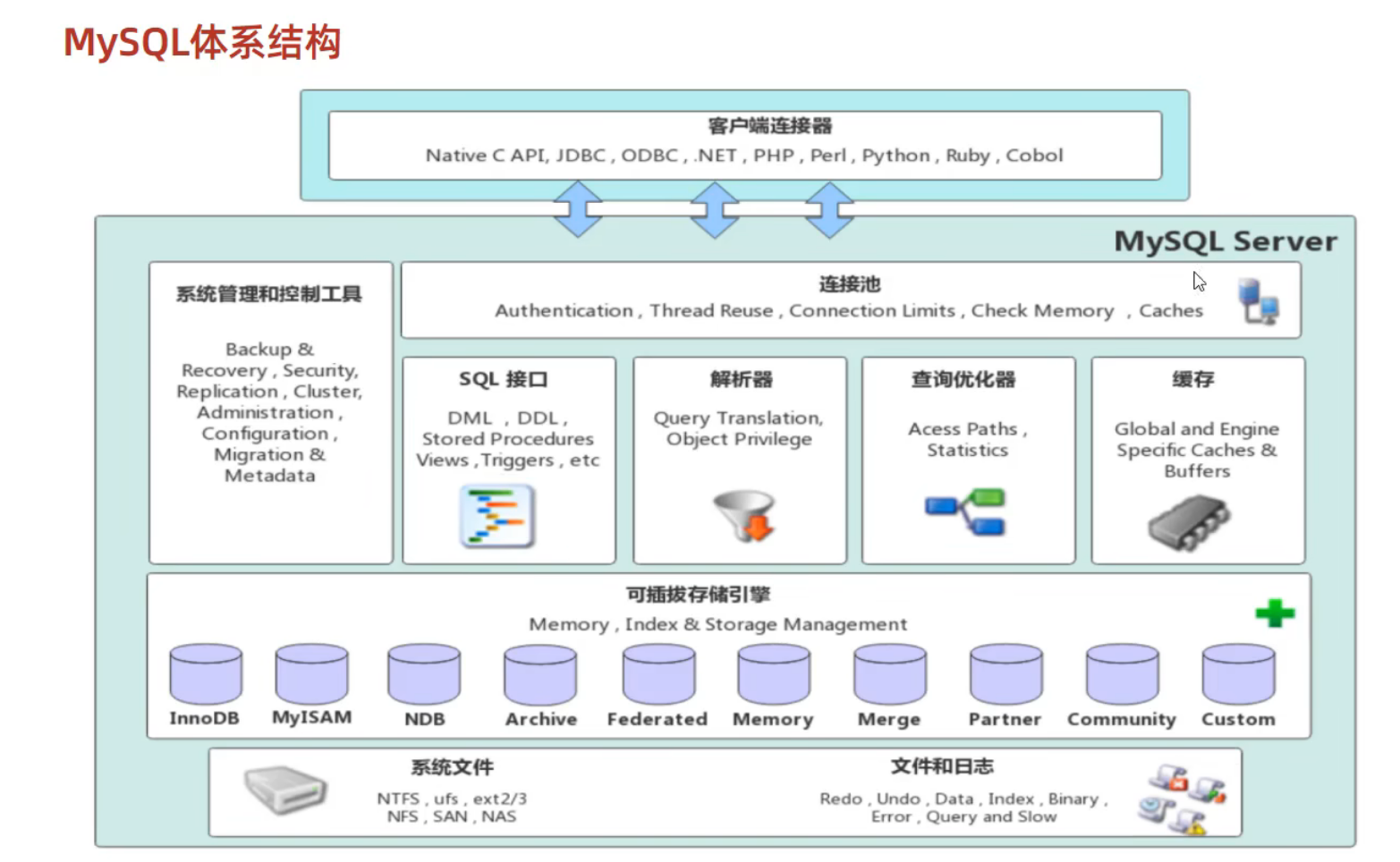
- 连接层:
- 服务层: SQL接口,缓存,分析和优化,内置函数的执行
- 引擎层:可插拔式的各种引擎
- 存储层: 将数据存储在文件系统
存储引擎简介
- 存储引擎是存储数据,建立索引,更新/查询数据等技术的实现方式
- 存储引擎是基于表的
1
2
3
4
5
create table my_table(

) engine=INNODB [comment];

show engines;
存储引擎特点
- InnoDB: 高可靠性,高性能
- DML遵循ACID:增删改查遵循原子性,一致性,隔离性,持久性
- 行级锁,提高并发访问性能
- 支持外键约束
- 文件对应: tablenanme.ibd(表空间文件),存储表的表结构(frm,sdi),数据和索引
- innodb_file_per_table: 8.0之后就是默认打开,即每张表都对应一个表空间文件
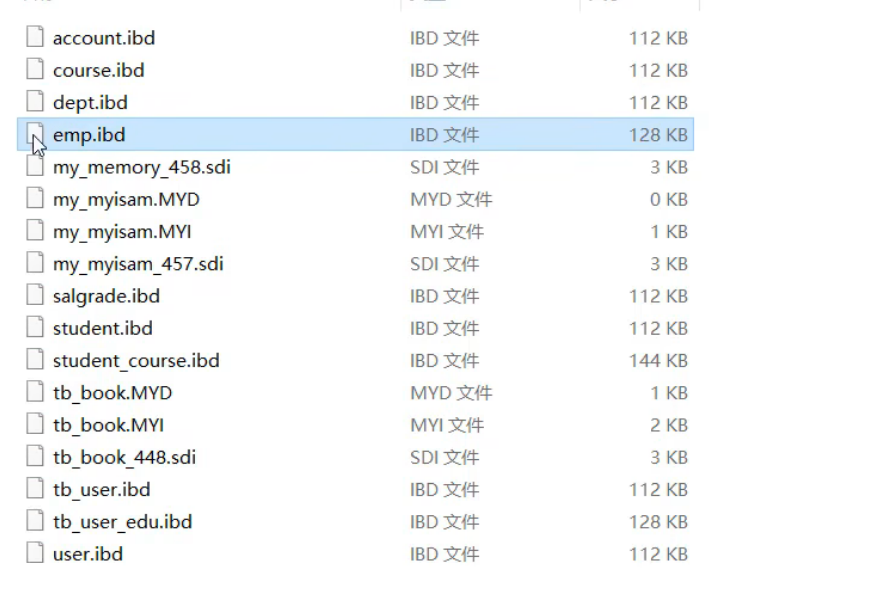
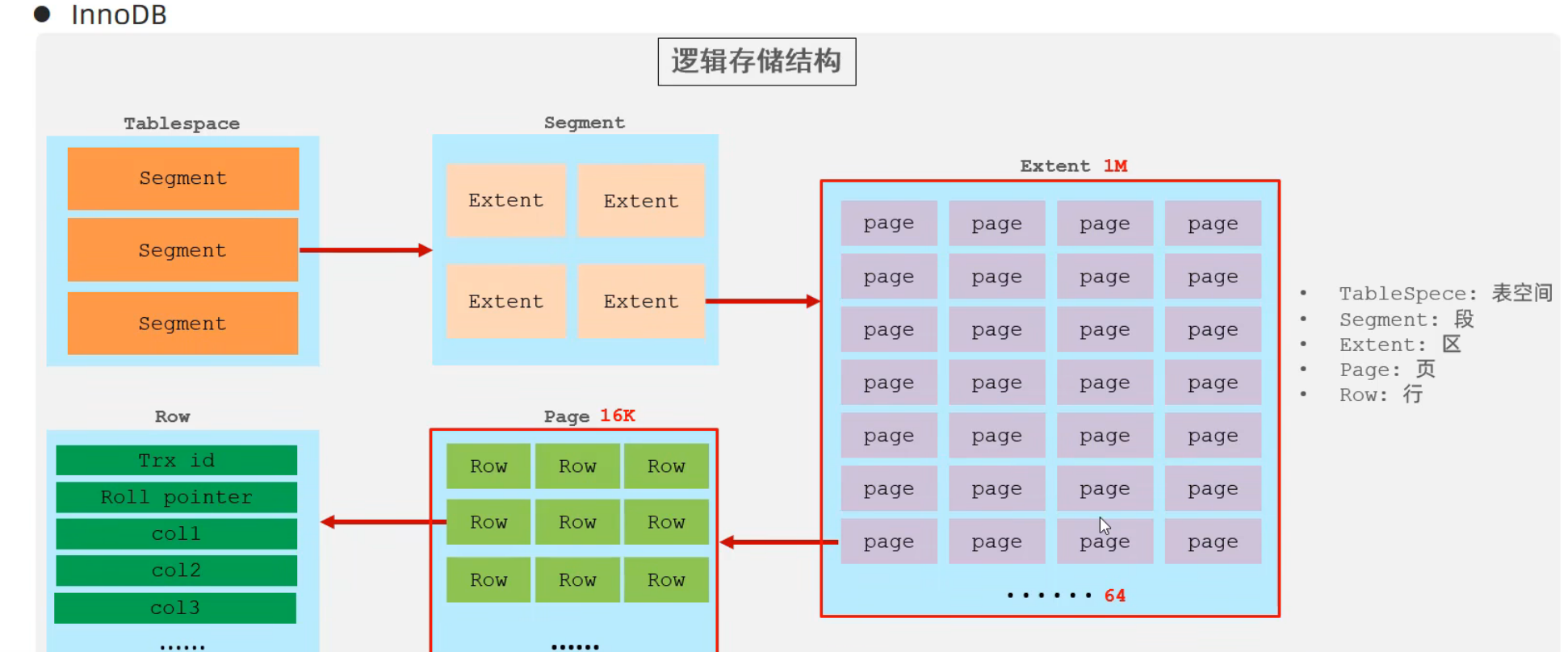
ibd2sdi- 逻辑存储结构: TableSpqce,Segment,Extent,Page,Row
- MyISAM
- 不支持事务,不支持外键
- 支持表锁,不支持行锁
- 访问速度快
MYD表数据MYI表索引sdi表结构
- Memory
- 存在内存
- hash索引
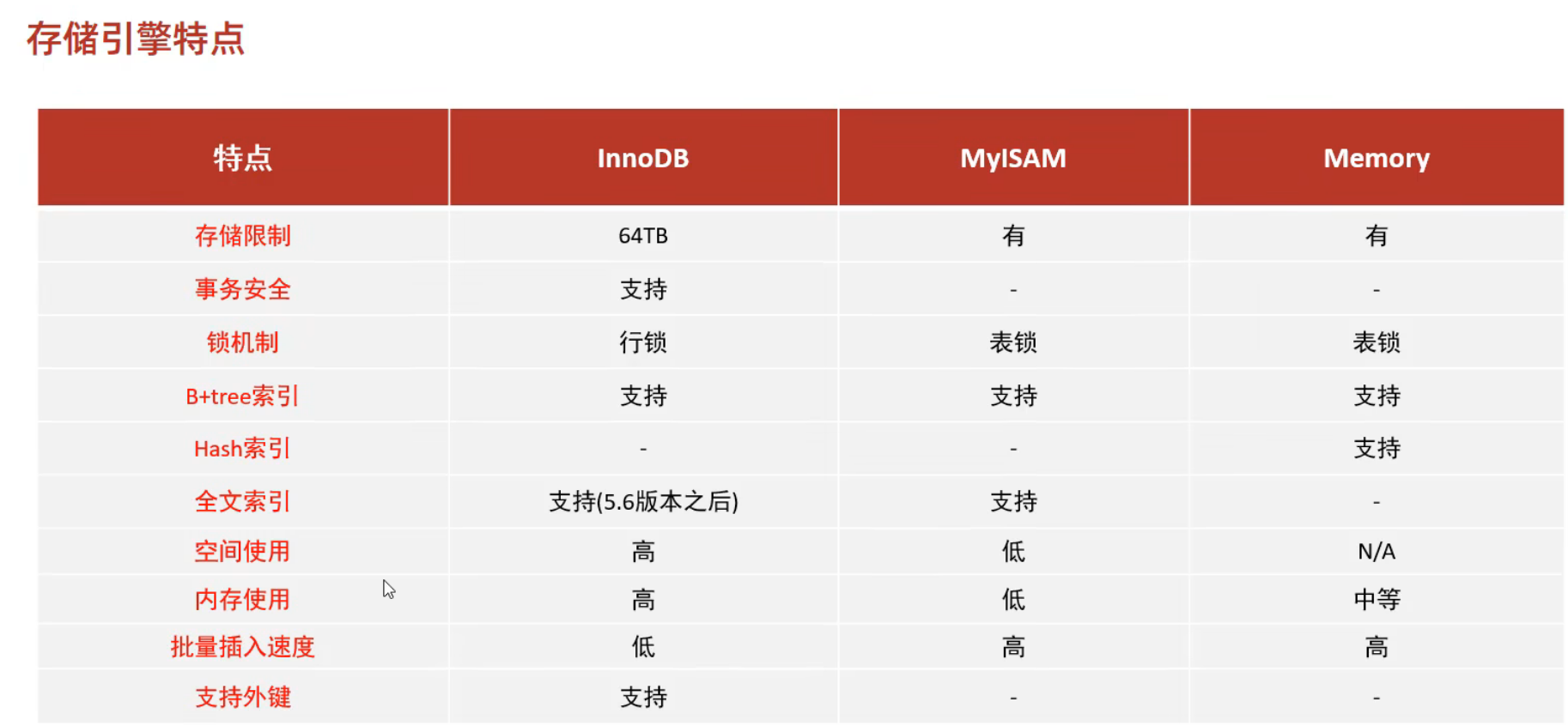
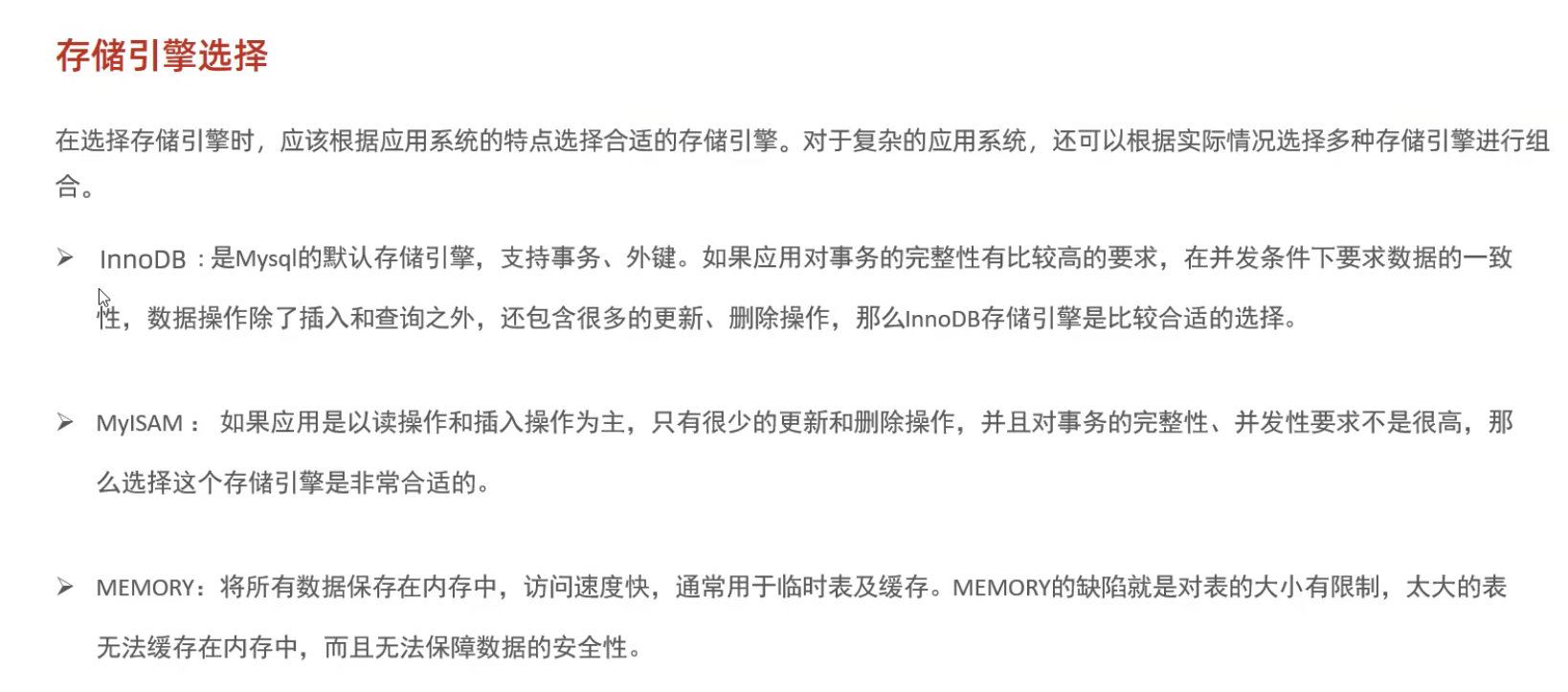
存储引擎选择
索引
索引概述
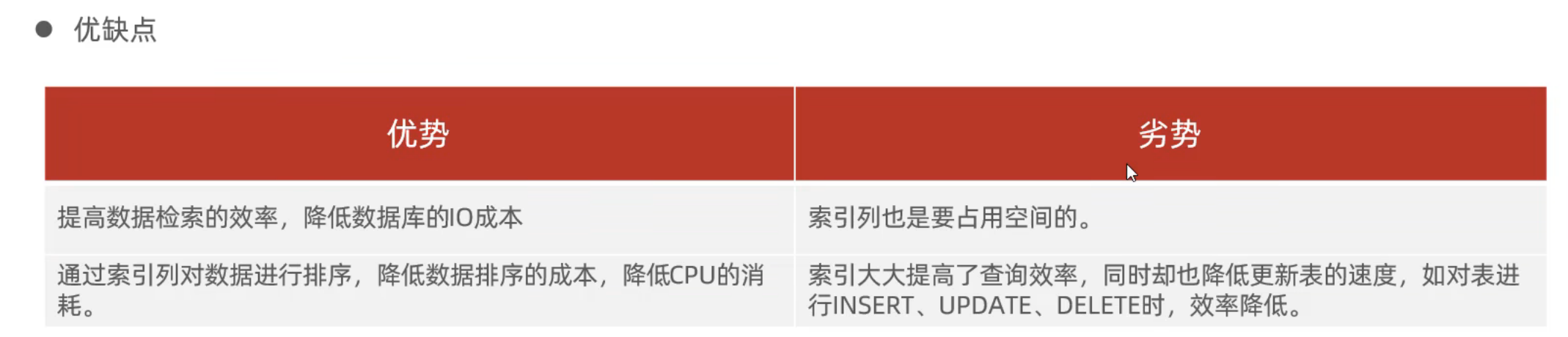
- 是帮助Mysql高效获取数据的数据结构
索引结构
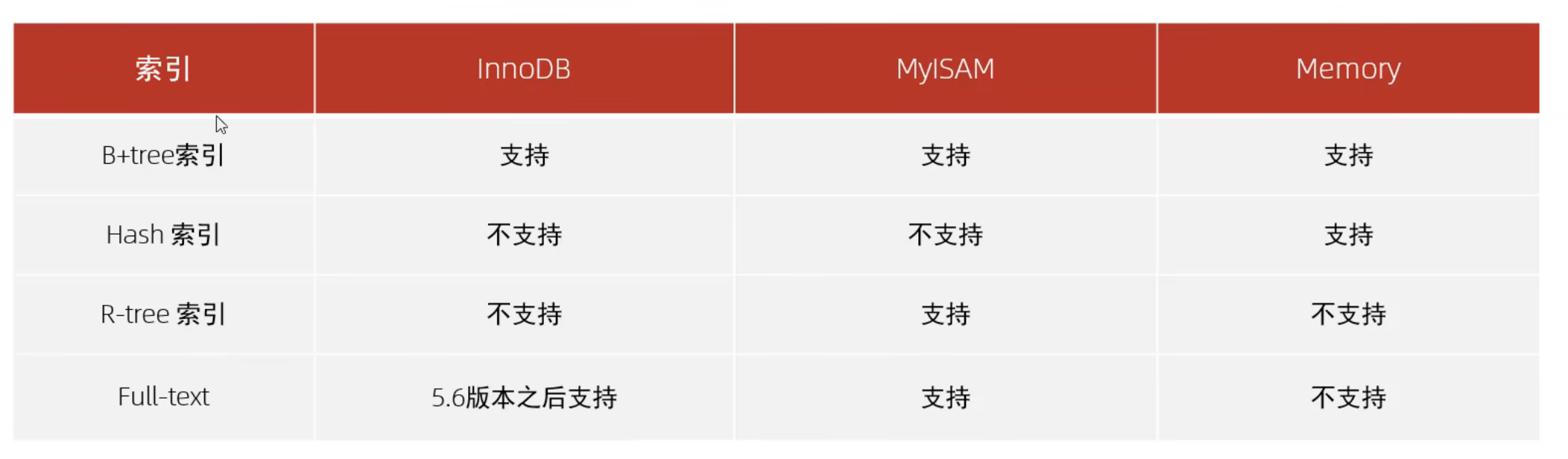
- B+Tree :
- Hash :
- Memory引擎支持
- InnoDB有自适应hash
- R-Tree : 地理空间数据
- Full-text: 快速匹配文档
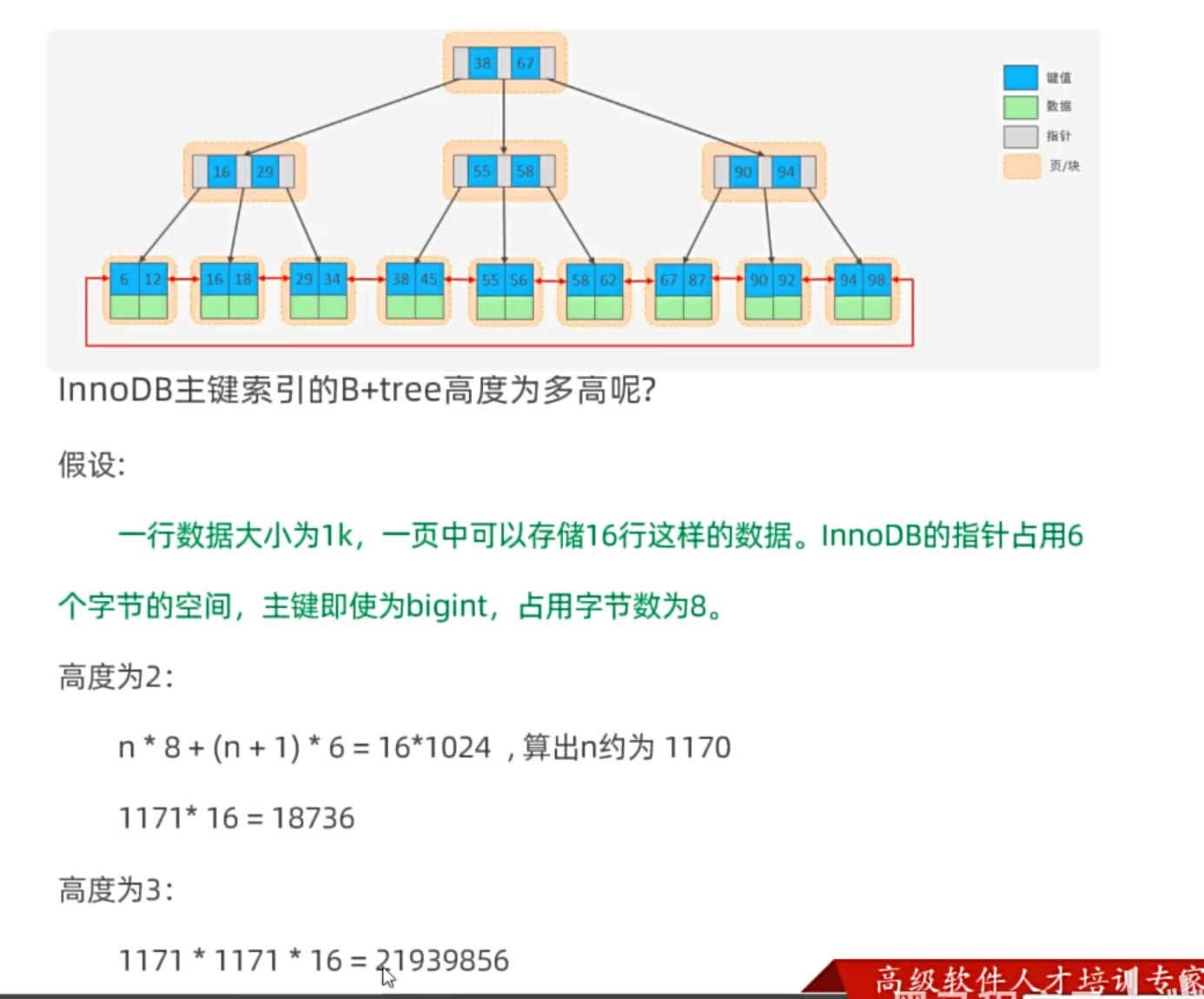
使用B+树:
- 相对于二叉树,层级更少,搜索效率高
- 由于MySQL的存储在页中的特性,所以如果我们使用B+树,对于索引来说不存储数据,所以就可以多存很多索引,然后就可以极大减少树的高度
- B+树底层维护有双向链表,十分支持范围索引
索引分类
- 主键索引:
PRIMARY默认自动创建,只能有一个 - 唯一索引:
UNIQUE只能有一个 - 常规索引:
- 全文索引:
FULLTEXT
在InnoDB中,按照索引的存储形式
- 聚集索引: 数据存储和索引放在一起,索引结构的叶子节点保存了数据,必须有,只能有一个
- 二级索引:数据于索引分开,索引结构的叶子节点关联的是对应的主键,可以放多个(查找数据时候是
回表查询)
聚集索引选取规则:
- 有主键,选主键
- 没主键,选第一个UNIQUE
- 啥也没,自动生成一个rowid作为隐藏的聚集索引
索引语法
- 单列索引,联合索引 ``` sql create UNIQUE INDEX index_name ON table_name (index_col_name, );
show INDEX FROM table_name; DROP INDEX index_name ON table_name;
1
2
3
4
5
6
7

#### SQL性能分析
我们主要优化的是查询语句
##### SQL的执行频率

``` sql
SHOW GLOBAL STATUS LIKE 'Com_______'
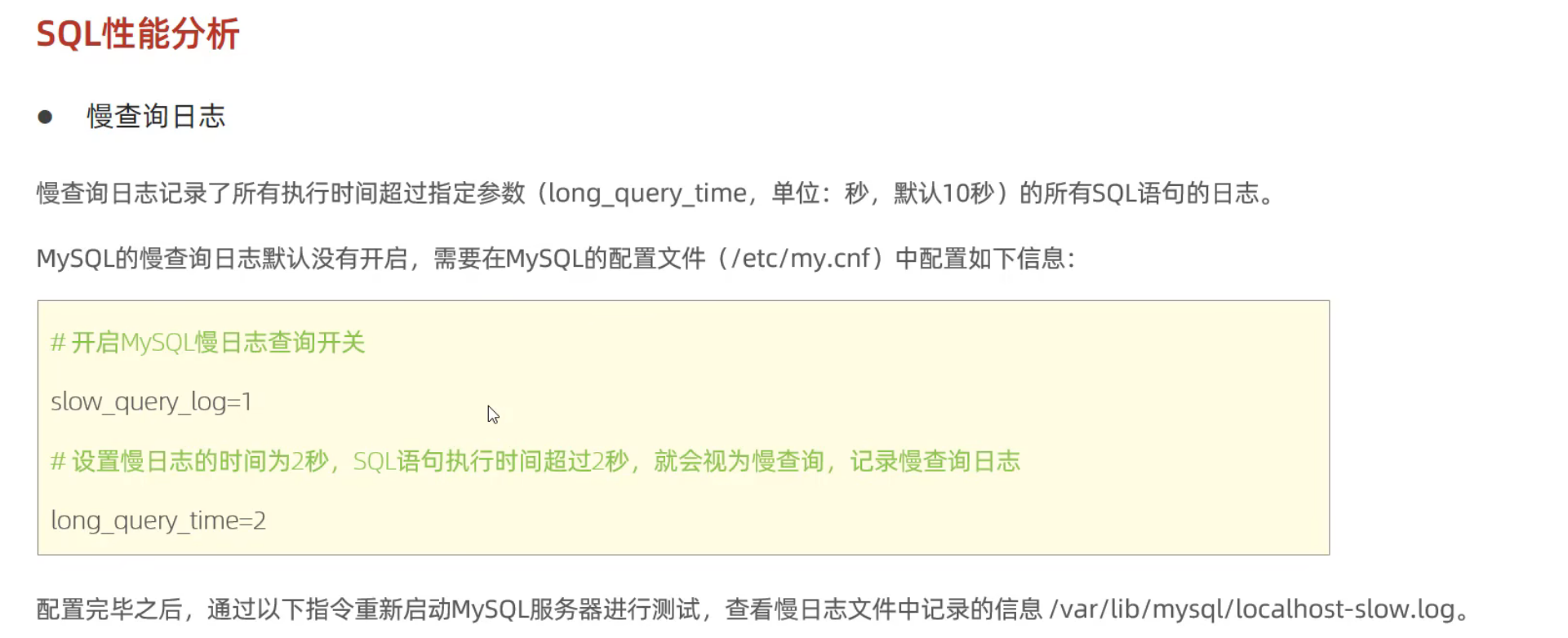
慢查询日志
1
* 默认没开启
1
2
3
4
show variablies like 'slow_query_log';

show_query_log  = 1
long_query_time = 2
profile详情
1
2
3
4
5
6
7
select @@profiling;

set profiling = 1 ;

show profiles;
show profile for query query_id;
show profile cpu for query query_id;
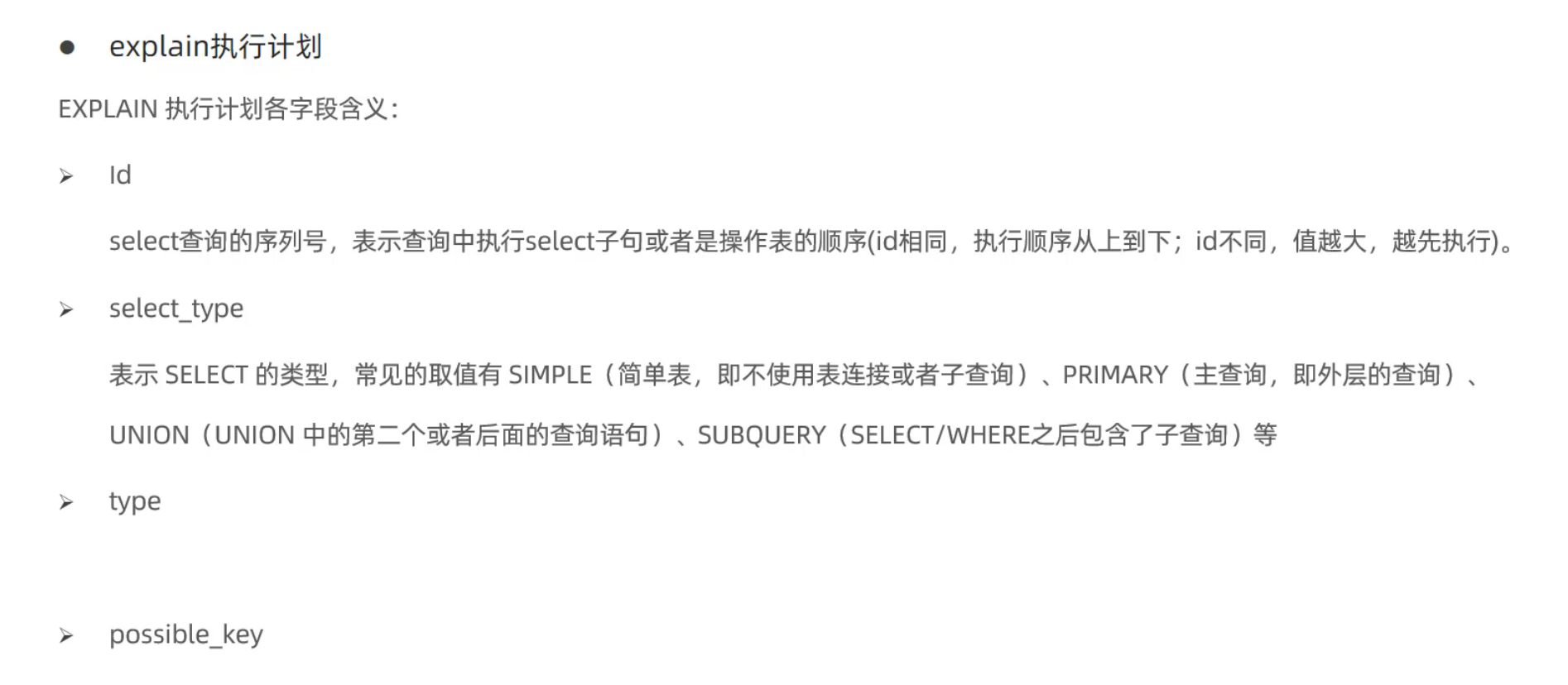
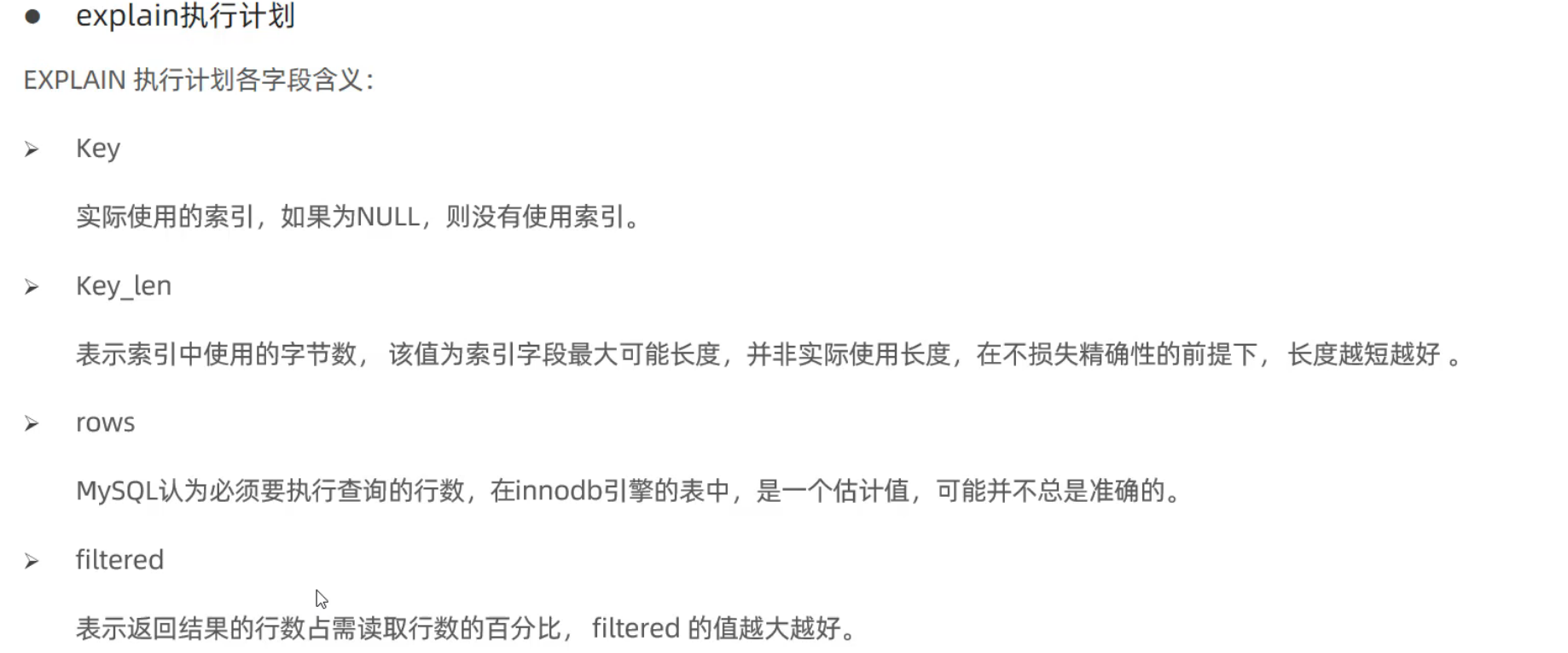
explain执行计划
1
2
desc + sql;
explain + sql;
索引的使用原则
- 最左前缀法则: 在联合索引中,最左边的条件必须存在,而且中间不能跳,否则后面的条件会被忽略(索引部分失效现象)
- 注意,只要求是否出现,而没有要求出现的顺序,因为MySQL是有优化器的
-
范围查询(>,<)会使得右侧的列索引失效,但是(>=,<=)仍旧可以生效
-
尽量不要在索引列上进行运算操作,会造成索引失效
-
字符串类型不加单引号,会隐式类型转换,导致无法使用索引,仍然会有最左前缀
- 模糊匹配:
- 尾部模糊: 不会失效
- 头部模糊: 失效
- 模糊匹配如果放入
全值,模糊了个寂寞,索引照样失效
- or连接的条件
- or前有索引,or后没索引,索引都不会生效,只有前后都有索引才会用到索引
- 数据分布影响
- 如果MySQL评估索引比全表慢,就会执行全表扫描
- SQL提示
- 如果有联合索引和单列索引,MySQL会自己评估,然后自己选择一个数据库
use indexignore indexforce index
1
  select * from table_name use index(index_name) where
use index只是建议,决策MySQL会自己决定 - 覆盖索引
- 这里其实就解释了我们为什么要选择联合索引,也就是说,我们尽量不要使用
select *,而是让我们需要的列都包括在了我们的索引里面,这样就避免了一次回表查询
- 这里其实就解释了我们为什么要选择联合索引,也就是说,我们尽量不要使用
- 前缀索引
- 为了解决字符串索引过大的问题
- 牺牲的就是一些性能,在很多情况下都需要回表
- 前缀索引的索引会命中多个值,这时候会进行多个回表,然后再进行一次比较
1
2
  create index index_name_5 on table_name(email(5));
  show index from tb_name;
- 单列索引和联合索引的选择
- 其实就是看你有多个数据需要返回
- 推荐使用联合索引
- 但是,需要注意最左原则
索引设计原则
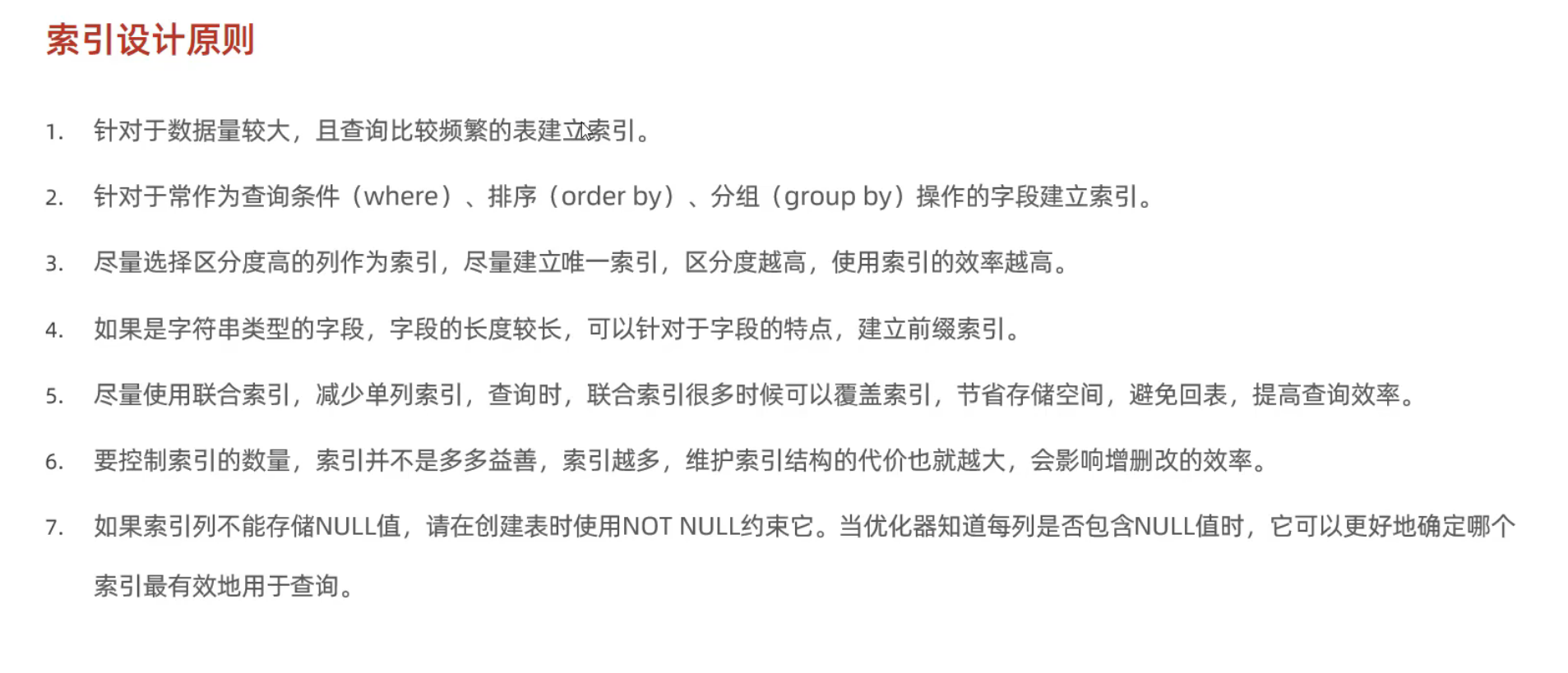
- 数据量在百万级别才迈入较大的门槛
SQL优化
插入数据
- 批量插入
- 手动事务提交
- 主键顺序插入
-
大批量数据插入使用
load1 2 3 4 5
mysql --local-infile -u root -p set global local_infile = 1; local data local infile `/root/load_user.sql` into table 'tb_name' fields terminated by ',' lines terminated by '\n'
主键优化
- 数据组织方式:InnoDB存储引擎中,表数据都是根据主键顺序组织存放的,这种存储方式的表称为索引组织表
- 页可以为空,可以半满,可以全满,每页包含了2-N行数据(B+树的性质决定的)
- 页分裂:
- 页合并: 当删除某一行记录,实际上没有被物理删除,而是标记flaged,为删除并且它的空间变得允许被其他记录声明使用
- 主键设计原则:
- 尽量降低主键长度
- 插入数据时,尽量选择顺序插入
- 尽量不要使用UUID或者身份证号做主键
- 避免对主键的修改
order by优化
- Using filesort:通过表的索引或者全表扫描,读取满足条件的数据行,然后在排序缓冲区sort buffer中完成排序操作,所有不是通过索引直接返回排序结果的排序都叫FileSort排序
-
using index:
- order by 的条件是分顺序的,可能违背最左前缀法则,导致filesort
1
2
3
order by age asc, phone asc --using index
order by age desc, phone desc --  using index
order by age asc, phone desc -- using index; using filesrot
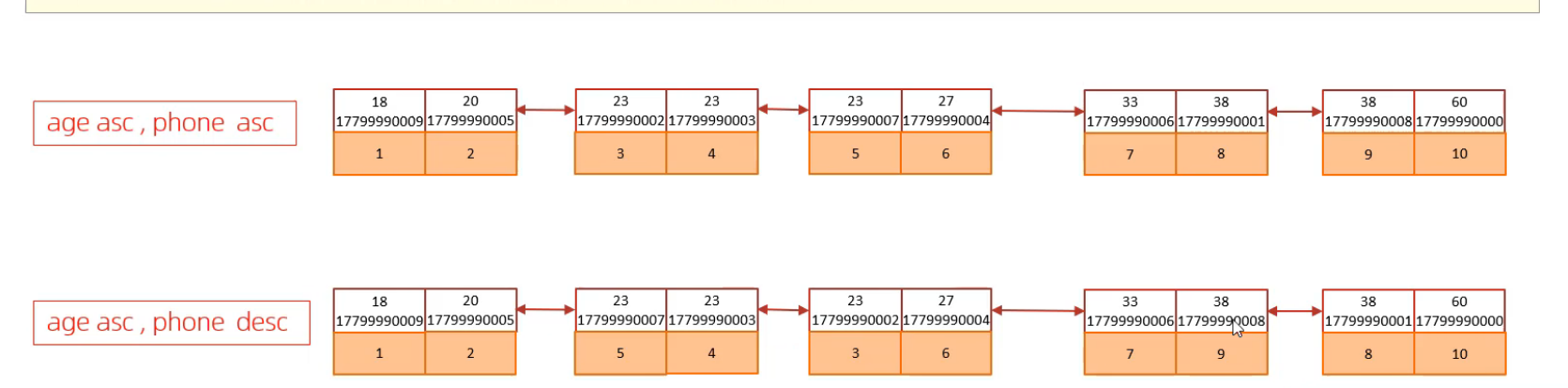
应该很好理解的
group by 优化
using index: 即使违背最左前缀法则,如果满足覆盖索引MySQL仍然会认为我扫描全表不如扫描这个覆盖索引,照样能拿回数据,所以会触发using indexusing temporary: 没有触发覆盖索引,对于索引 index (A,B,C) 我们只对C操作,这时候MySQL会利用一个临时表的东西
limit 优化
- 大数据面前,页数越往后,耗时越长,越往后越废气
- MP中只是使用了limit,所以当offset过大时,非常耗时
- 覆盖索引 + 子查询优化
- 我们分页查询只查id
- 拿到id之后我们自己去进行子查询
- 因为in后面不能有limit,所以我们当作表联合查询
1
2
3
select s.* from tb_sku s,
(select id from tb_sku order by id limit 9000000,10) a
where s.id = a.id
- 还有一种特别快的优化,就是使用
where id>= and id<=但是为什么不适用这个呢?就是因为id可能不连续,会导致失败
count 优化
select count(*) from tb_user; 这条查询会很慢
- MyISAM会把总行数存在磁盘上,因此执行count(*)效率高
- InnoDB执行count(*)时,会一行一行读取数据再累加
- 优化思路: 自己计数
- 我们直接存Redis
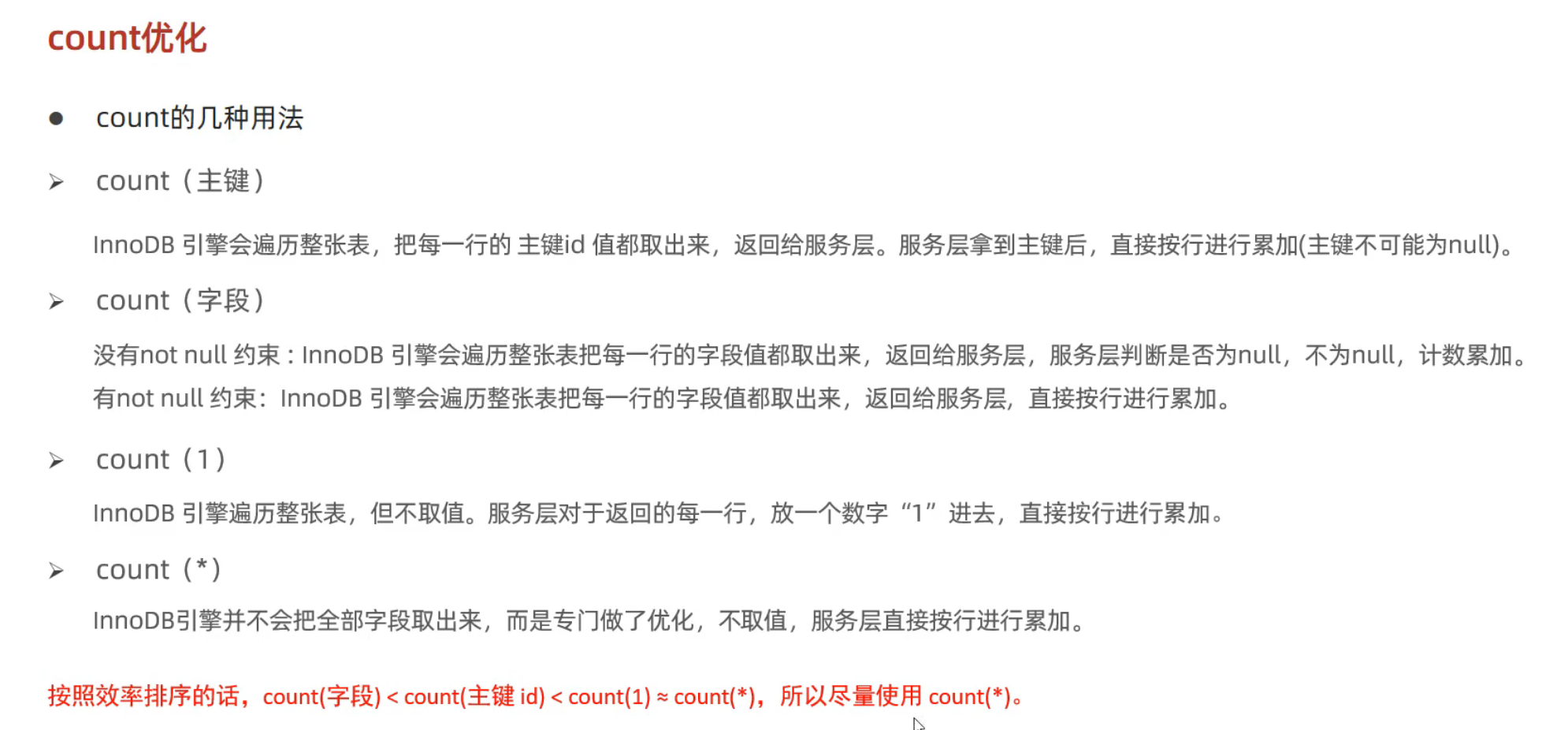
- count()对于结果集会一行一行判断,如果参数不是NULL,累计值就会+1 ,否则不会加
- count(*) count(主键) count(字段) count(1)
1
2
3
4
select count(*) from tb_name;
select count(id) from tb_name;
select count(name) from tb_name;
select count(1)  from tb_name;
update优化
- 如果有索引,锁住的是行数据
- 没有索引,锁住的是表
视图/存储过程/触发器
视图
视图是虚拟的表,视图中的数据实际并不存在,数据来自于基表,视图的本质是查询语句
1
2
3
4
5
6
7
8
9
10
11
12
13
14
15
16
17
18
19
20
21
22
create [OR REPLACE] view v_name as select [];

show create view v_name;

select * from view v_name;
select * from view v_name where id = 6;

-- 修改视图
create or replace view v_name as select [];
alter view v_name as select [] ;

--删除视图
drop view [if exists] v_name;

-- 单表视图可以insert
insert into v_name values();
--插入视图数据,实质上是插入到了原表,视图不会被改变

-- with cascaded check option
--阻止插入不满足where条件的数据
create or replace view v_name as selecet * from tb_mame
where id <=20 with casceded check option;
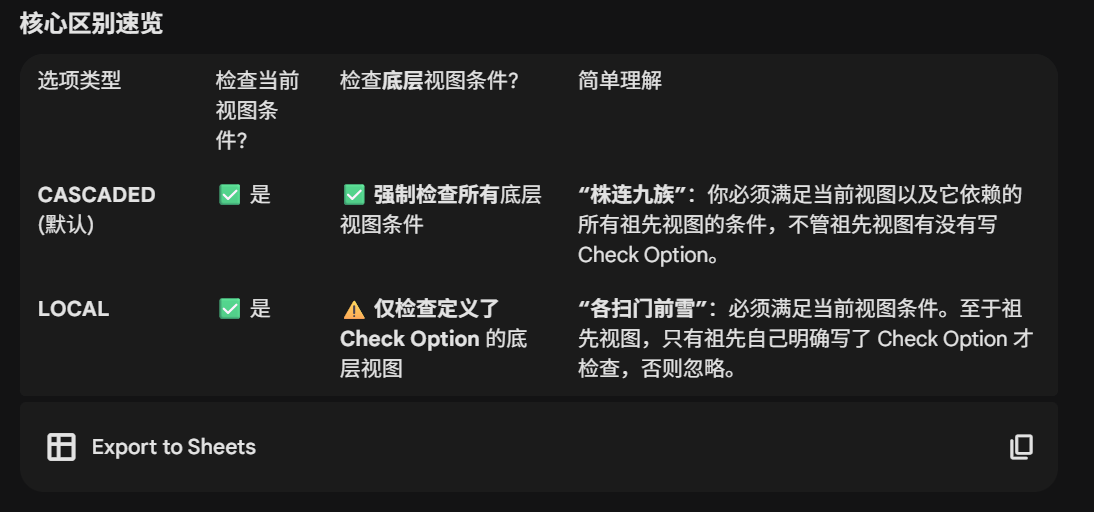
- 视图的检查选项
with cascaded check option(默认)- 级联,不仅会判断是否满足视图规则,还会向下去找视图或表的限制规则
with local check option- 视图的检查本来就会递归
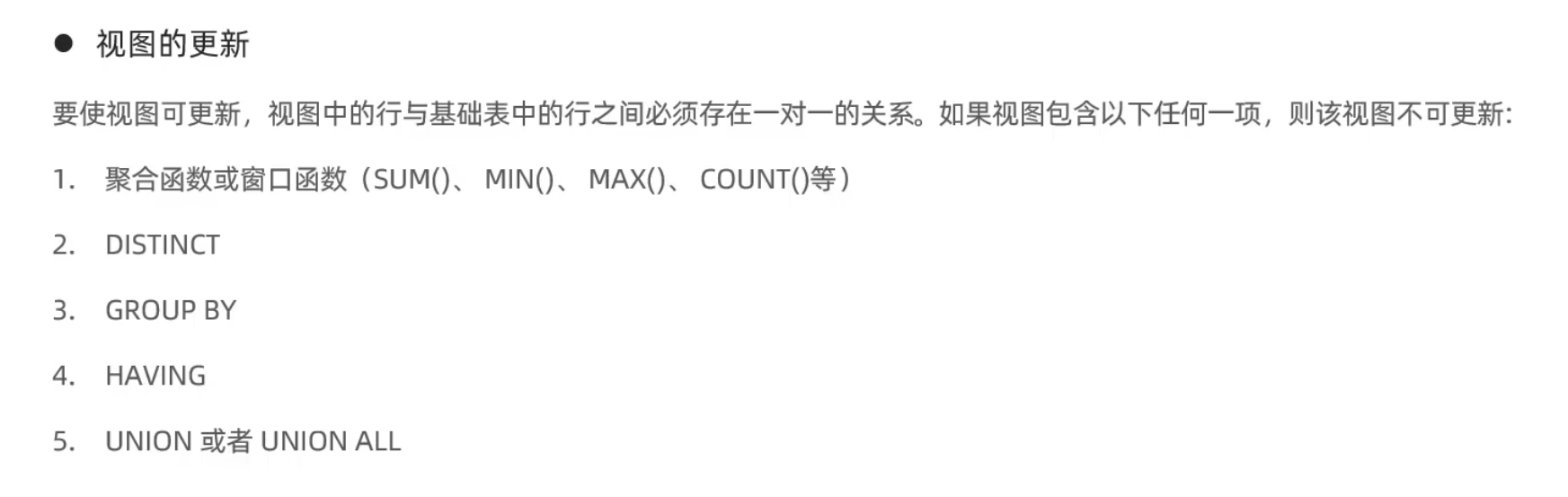
视图的更新
视图的作用
- 简单: 视图可以简化操作, 经常使用的查询可以被定义为视图
- 安全: MySQL的授权是基于表的,如果要屏蔽字段,可以新建一个视图
- 数据独立: 视图可以帮助用户屏蔽真实表结构变化带来的影响
存储过程
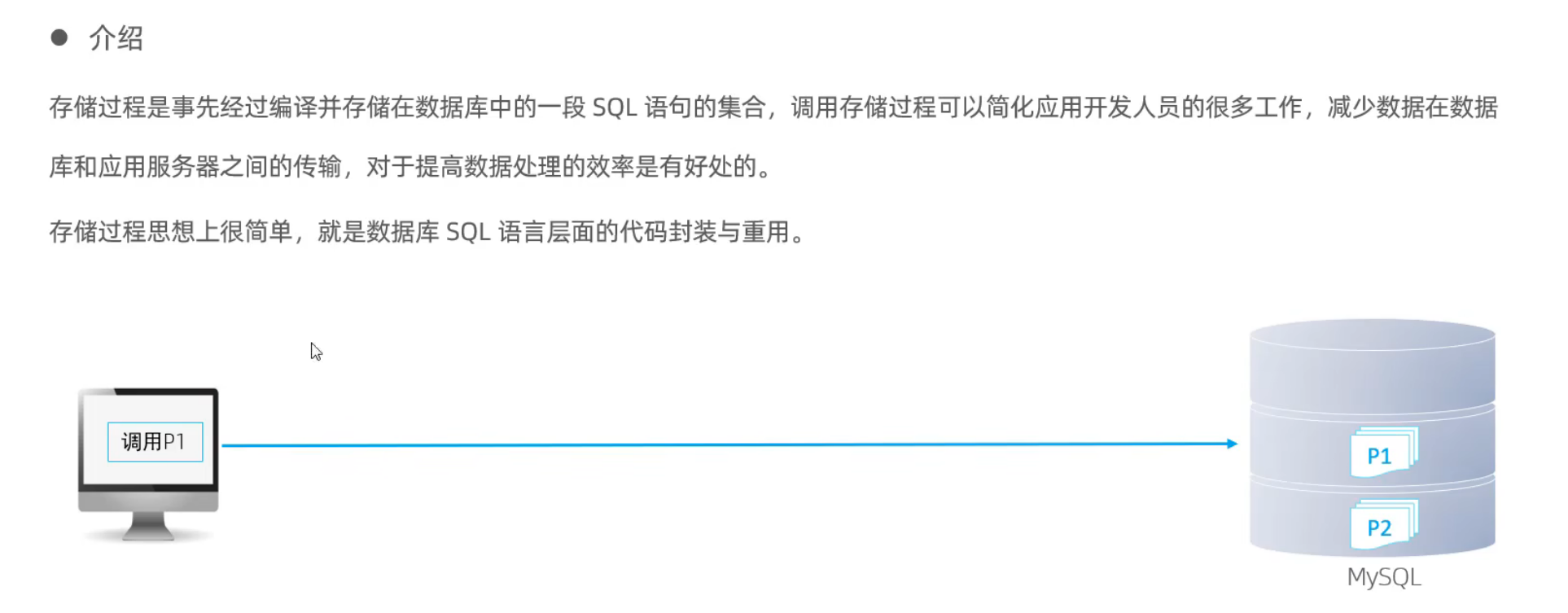
- 封装SQL语句便利复用
- 存储过程可以接受参数,返回数据
- 减少网络交互,效率提升
基本语法
1
2
3
4
5
6
7
8
9
10
11
12
13
14
15
create procedure pro_name([params])
begin

end;

-- 调用
call pro_name;

-- 查询
select * from information_schema.ROUTINES where
ROUTINE_SCHEMA = 'tb_name'

show create procedure p1;
-- 删除
drop procedure if exists p1;
变量
- 系统变量
- GLOBAL
- SESSION
1
2
3
4
5
6
show [session|global] variables;  -- 默认session
show [session|global] variables like '';
select @@[session|global] var_name;

set [session|global] var_name = Value;
set @@[session|global] var_name = Value;
- 用户变量: 作用域为当前连接
- 赋值
- 使用
1
2
3
4
5
set @myname = 'hzy';
set @myage := 60;
set @mygender := '男',@myhobby := 'java';
-- 使用
select @myname;
- 局部变量: 定义的在局部生效的变量,可以在存储过程内部使用,可以作为输入参数
- 声明
- 赋值
1
2
3
4
5
6
create procedure p2()
begin
    declare stu_count int default 0 ;
    set stu_count := 100;
    select count(*) into stu_count from student;
    select stu_count;
IF
1
2
3
4
5
6
7
8
IF con1 THEN

ELSEIF con2 THEN

ELSE

END IF;
in/out/inout参数
1
2
3
4
5
6
7
8
9
10
11
12
13
14
15
16
17
18
19
20
21
22
create procedure p4(in score int, out result varchar(10))
begin
    if score >= 85 then
        set result := '优秀'
    elseif score >=60 then
        set result := '及格'
    else
        set result := '不及格'
    end if;
end;

call p4(18,@score);
selcet @score;

create procedure p5(inout score double)
begin
    set score := score * 0.5;
end;

set @score = 189;
call p5(@score);
select @score;
case
1
2
3
4
5
6
7
8
9
10
11
12
13
14
15
16
17
18
19
20
21
create procedure p6(in month_value int,out month_result varchar(10))
begin
    case
        when month_value>=1 and month_value<=3 then
            set month_result = '春季';
        when month_value>=4 and month_value<=6 then
            set month_result = '夏季';
        when month_value>=7 and month_value<=9 then
            set month_result = '秋季';
        when month_value>=10 and month_value<=12 then
            set month_result = '冬季';
        else
            set month_result = '非法参数';
    end case;

    select concat('您输入的月份是:', month_value,', 属于的季节是: ',month_result);
end;


call p6(11,@month_result);
select  @month_result
while
1
2
3
4
5
6
7
8
9
10
11
create procedure p7(in n int)
begin
    declare total int default = 0 ;

    while n > 0 do
        set total := total + n ;
        set n := n - 1;
    end while;

    select total;
end;
repeat
1
2
3
4
5
6
7
8
9
10
11
create procedure p8(in n int)
begin
    declare total int default 0;
    repreat
        set total := total  + n;
        set n := n -1 ;+
    until n<= 0;
    end repeat;

    select total;
end
loop
1
2
3
4
5
6
7
8
9
10
11
12
13
14
15
16
17
18
create procedure p10(in n int)
begin
    declare total int default 0;
    sum : loop
        if n <=0 then
            leave sum;
        end ifl

        if n%2 = 1 then
            iterate sum;
        end if;

        set total := total + n;
        set n := n-1 ;
    end loop sum;

    select total;
end;
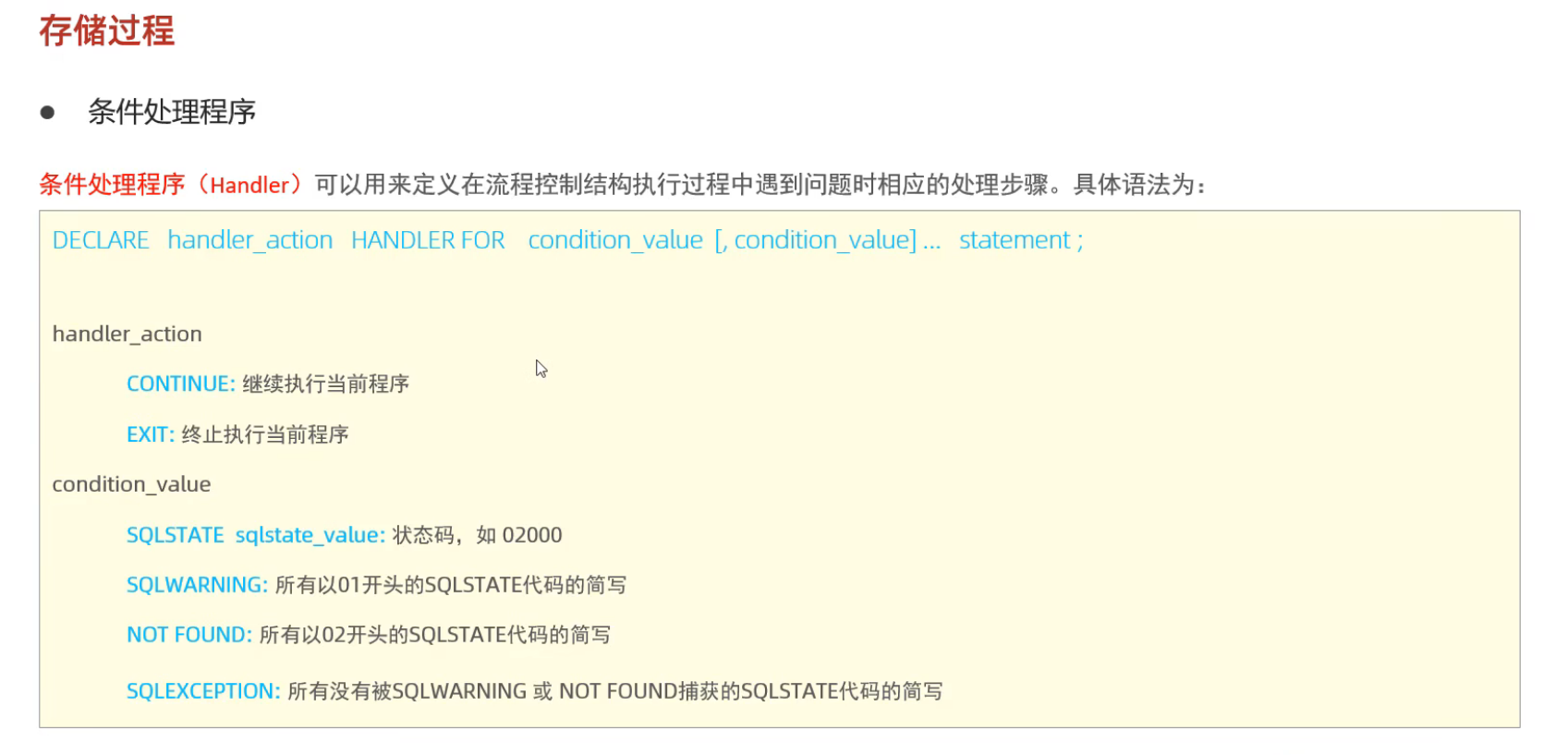
游标 和 Handler
用来存储查询结果集的数据类型,在存储过程和函数中可以使用游标对结果集进行循环的处理,游标的使用包括游标的声明,open,fetch,和close
1
2
3
4
5
6
7
8
9
10
11
12
13
14
15
16
17
18
19
20
21
22
23
24
25
26
create procedure p11(in uage int)
begin
    -- 先声明变量,再声明游标
    declare uname varchar(100)
    declare upro varchar(100)

    declare u_cursor cursor for select name,profession from tb_user where age <= uage


    create table if exists tb_usr_pro(
        id int primary key auto_increment,
        name varchar(100),
        profession varchar(100)
    );

    --开启游标
    open u_cursor;

    while true do --暂时用true,会报错
        --赋值
        fetch u_cursor into uname,upro;
        insert into tb_user_pro values (null,uname,upro);
    end while;
    -- 关闭游标
    close u_cursor;
end;
1
2
3
4
5
6
7
8
9
10
11
12
13
14
15
16
17
18
19
20
21
22
23
24
25
26
27
28
create procedure p11(in uage int)
begin
    -- 先声明变量,再声明游标
    declare uname varchar(100)
    declare upro varchar(100)

    declare u_cursor cursor for select name,profession from tb_user where age <= uage

    declare exit handler for SQLSTATE '02000' close u_cursor;
    declare exit handler for not found close u_cursor;

    create table if exists tb_usr_pro(
        id int primary key auto_increment,
        name varchar(100),
        profession varchar(100)
    );

    --开启游标
    open u_cursor;

    while true do --暂时用true,会报错
        --赋值
        fetch u_cursor into uname,upro;
        insert into tb_user_pro values (null,uname,upro);
    end while;
    -- 关闭游标
    close u_cursor;
end;
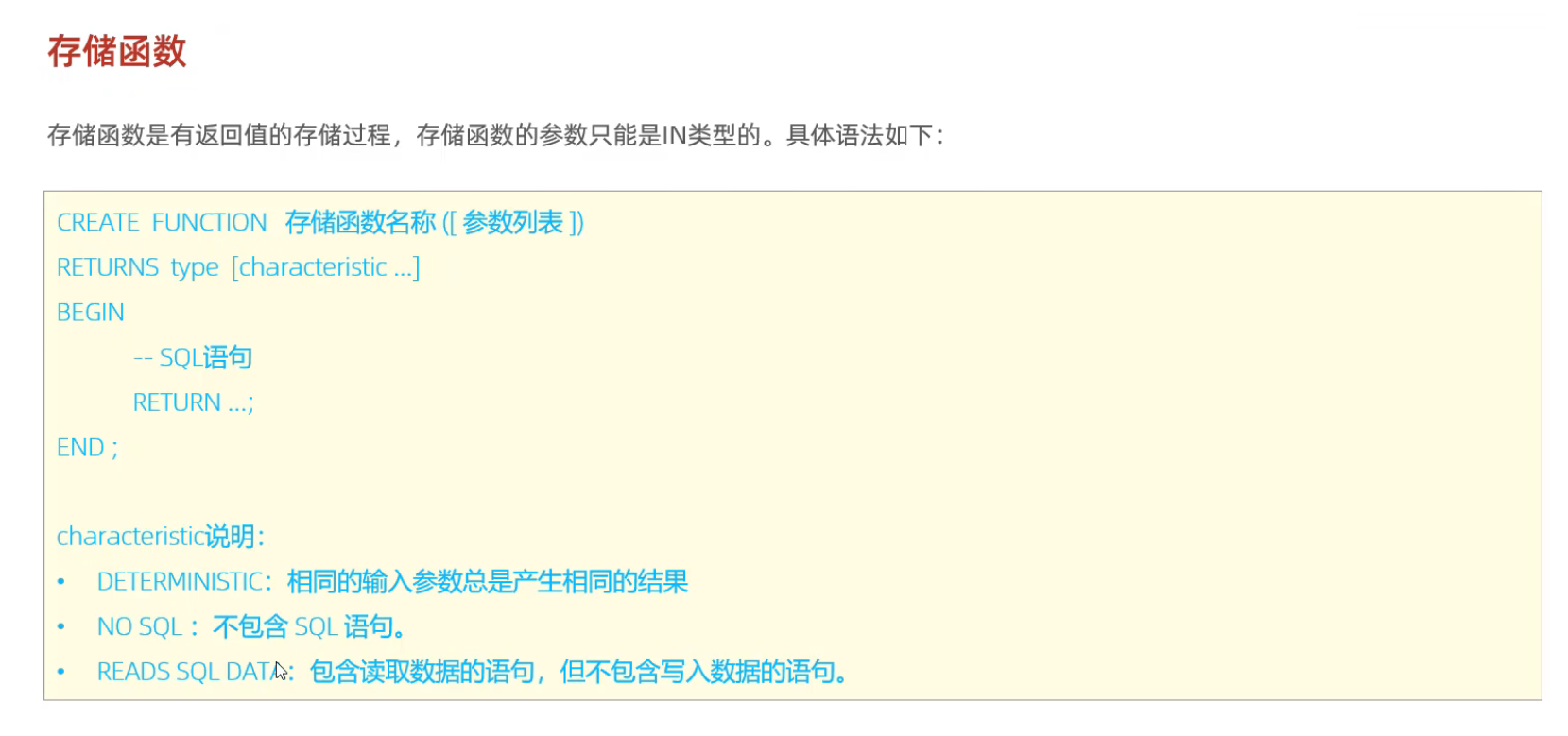
存储函数
- 有返回值的存储过程
- 参数只能是in类型
1
2
3
4
5
6
7
8
9
10
11
12
13
14
create function fun1(n int)
returns int deterministic
begin
    declare total int default 0;

    while n>0 do
        set total := total + n;
        set n := n - 1;
    end while;

    return total;
end;

select fun1(100);
触发器
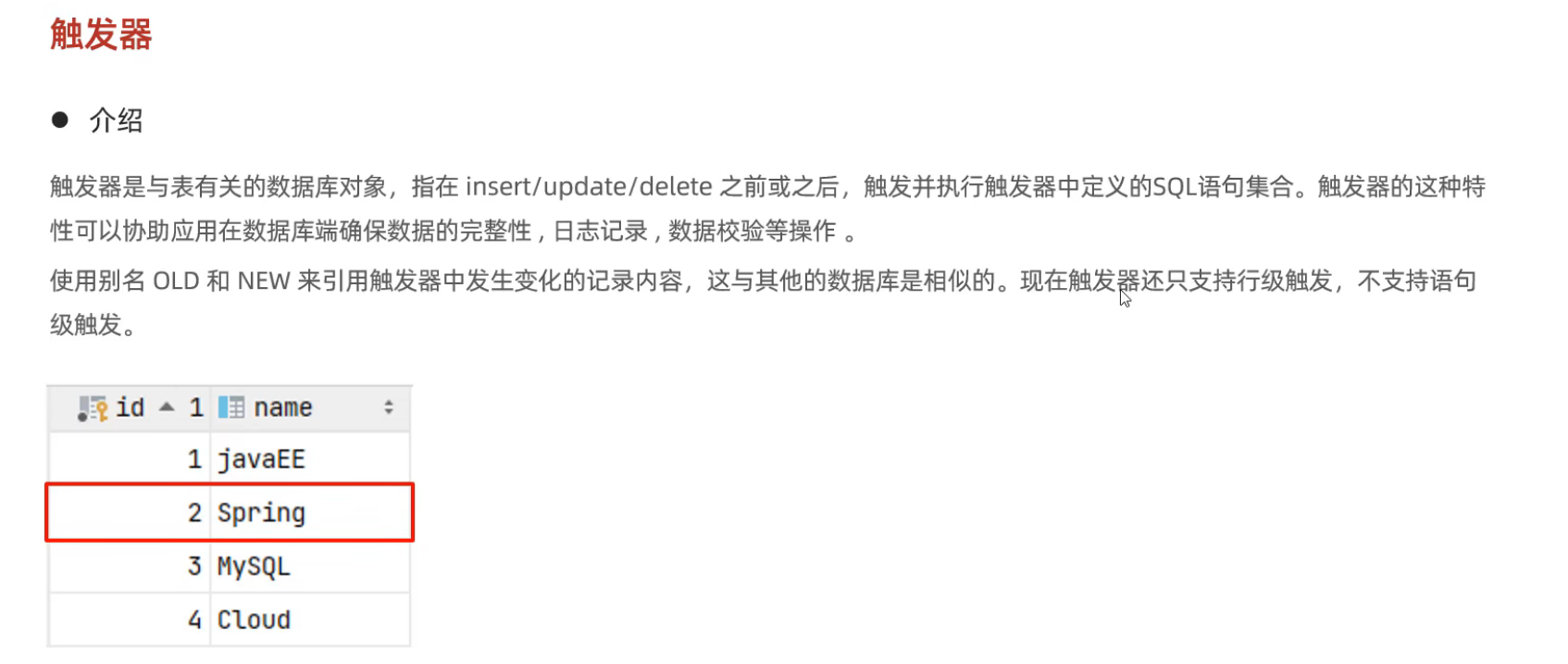
- 只支持行级触发器,不支持语句级触发器
insert类型
1
2
3
4
5
6
create trigger tb_user_insert_trigger
    after insert on tb_user for each row
begin
    insert int user_logs(id,operation,operate_time,operate_id,operate_params) VALUES
    (null,'insert',now(),new.id,concat('插入内容...'))
end;
update
NEW.id new.id OLD.id old.id
1
2
3
4
5
6
create trigger tb_user_update_trigger
    after update on tb_user for each row
begin
    insert int user_logs(id,operation,operate_time,operate_id,operate_params) VALUES
    (null,'update',now(),new.id,concat('插入内容...'))
end;
delete
1
2
3
4
5
6
create trigger tb_user_delete_trigger
    after update on tb_user for each row
begin
    insert int user_logs(id,operation,operate_time,operate_id,operate_params) VALUES
    (null,'delete',now(),old.id,concat('插入内容...'))
end;
锁
- 全局锁
- 表级锁
- 行级锁
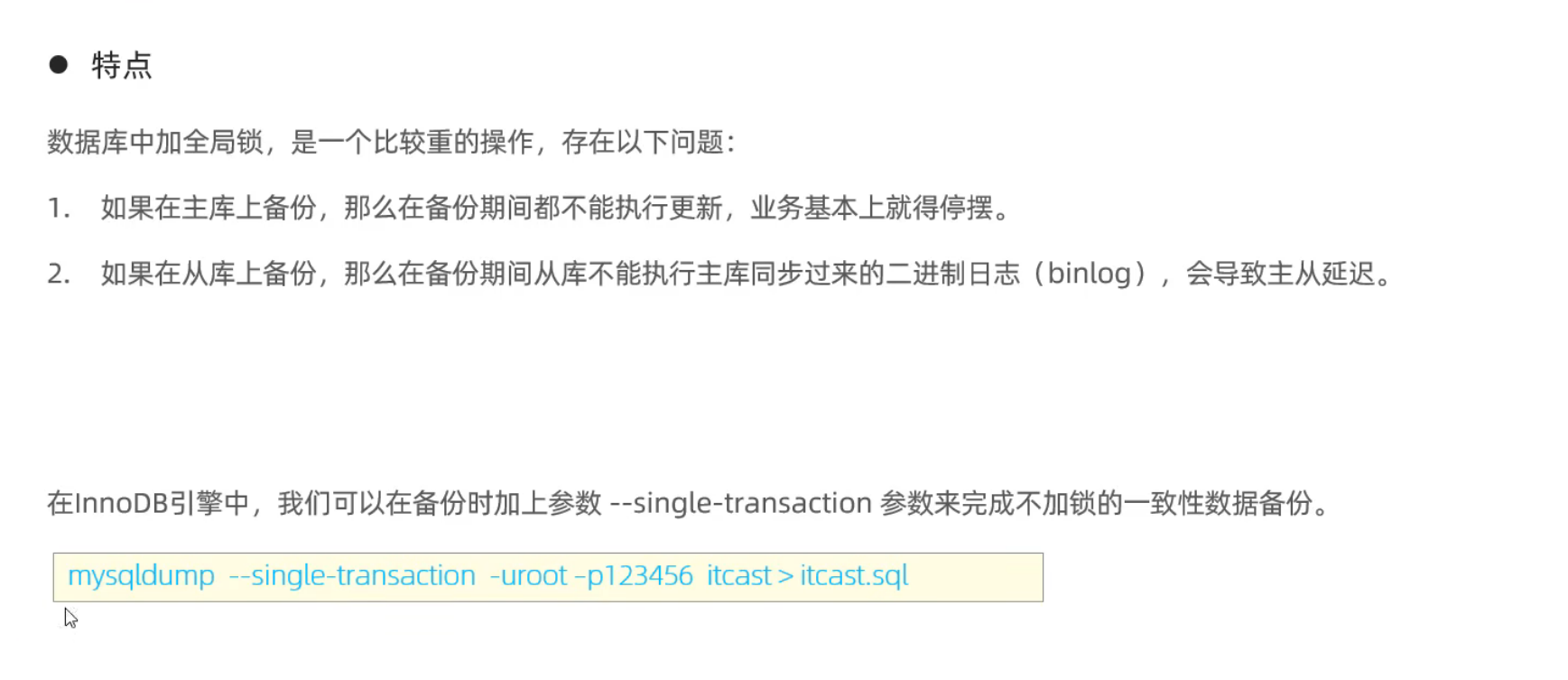
全局锁
- 全库的逻辑备份
表级锁
表锁
- 表共享读锁 read lock
- 表独占写锁 write lock
1
2
3
4
lock tables score read;
-- 只能读,其他表也能读
lock tables score write;
-- 只能写,其他表不能读写
元数据锁 MDL
meta data lock 当表有事务,则不能对元数据进行写入操作
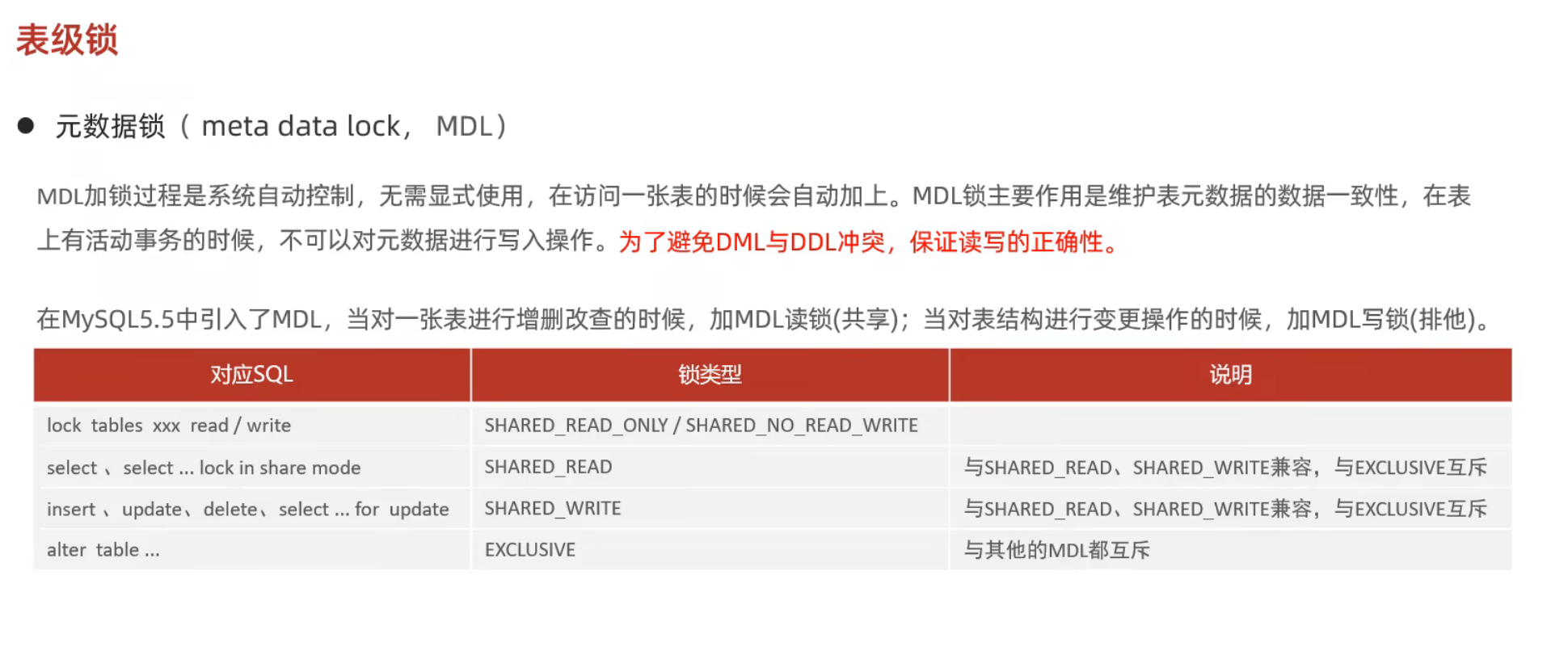
意向锁
- 意向共享锁 IS: 与read lock兼容
- 意向排他锁 IX: 都互斥
行级锁
- 主要在InnoDB引擎中
- InnoDB的锁是基于索引的,而不是数据
- 行锁
- 间隙锁
- 临键锁
行锁
- 共享锁S
- 排他锁X
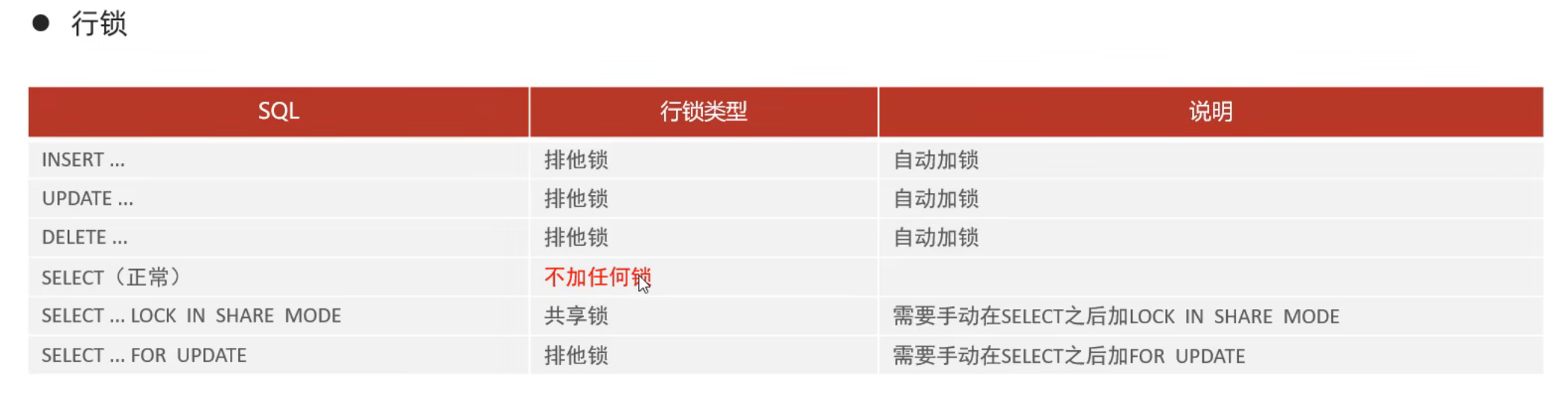
- 如果不对索引加锁,行锁会变成表锁
- 一定要注意这个
间隙锁和临键锁
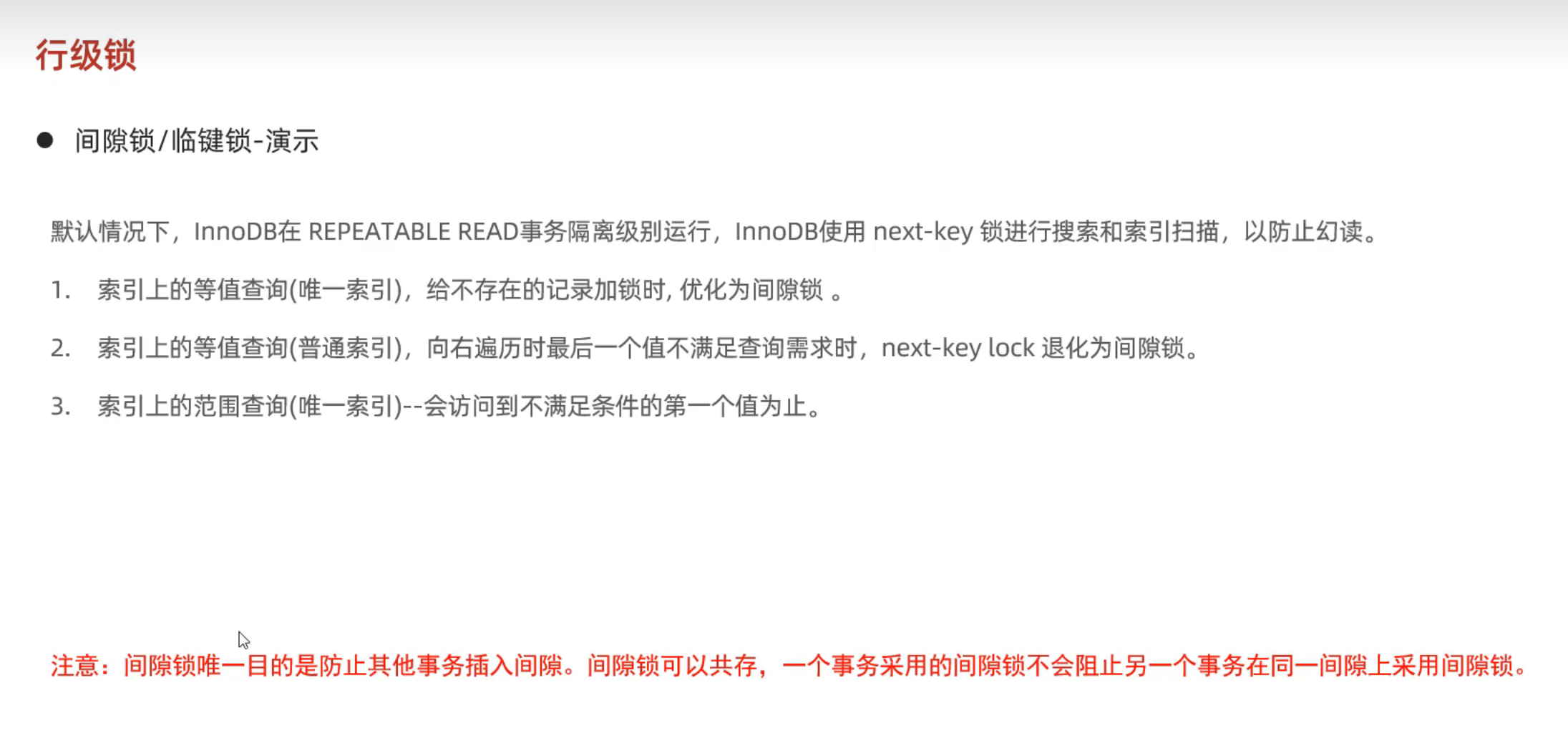
- 唯一索引的等值查询如果只有的数据的索引是1,3,8,11,15,我们update
id=5没有这个,就会给3--8上面加锁,不包括3,8 - 普通索引的等值查询如何给8加锁,会被优化成临键锁,给3–11都上锁(3,11不上锁)
- 如果是 >11 就会锁上11到正无穷
InnoDB
逻辑存储结构
架构
内存结构
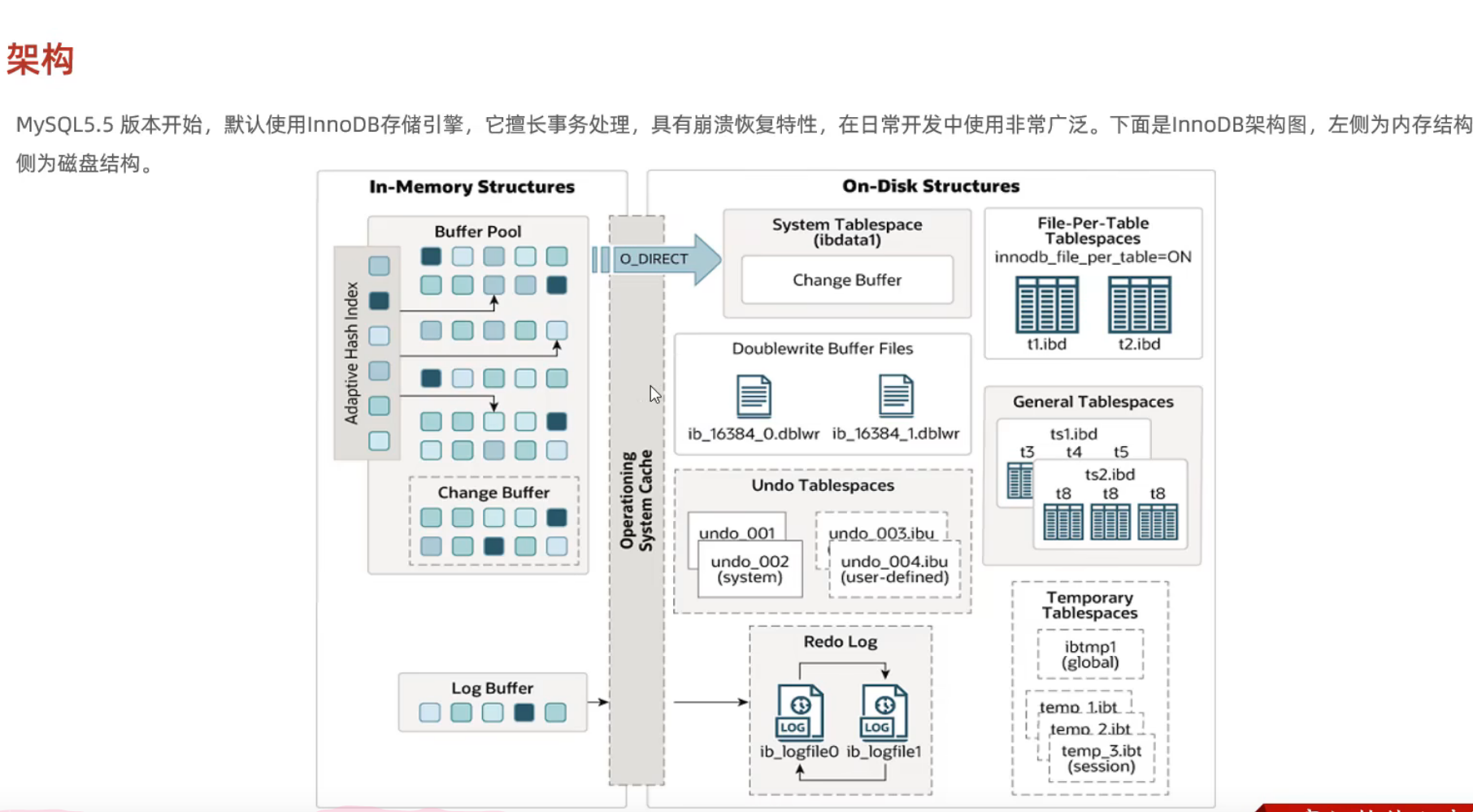
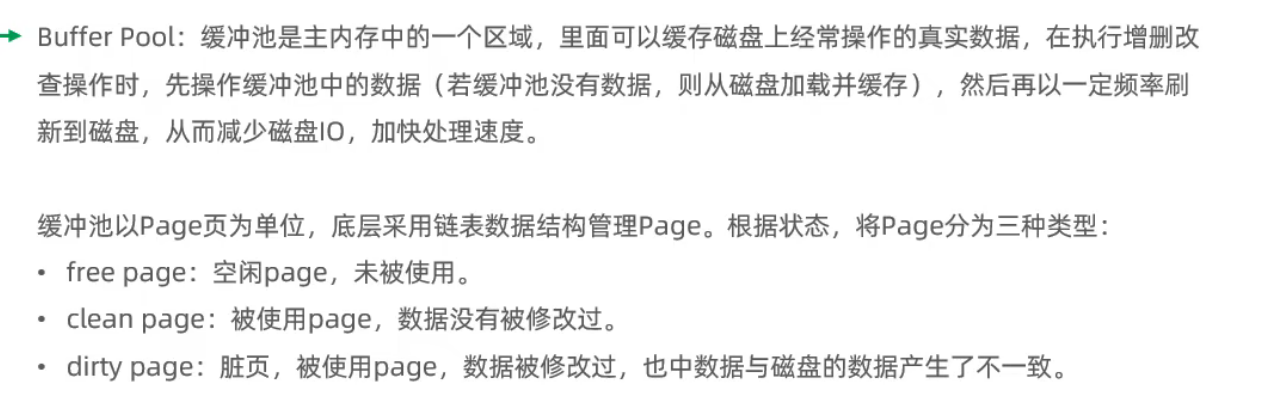
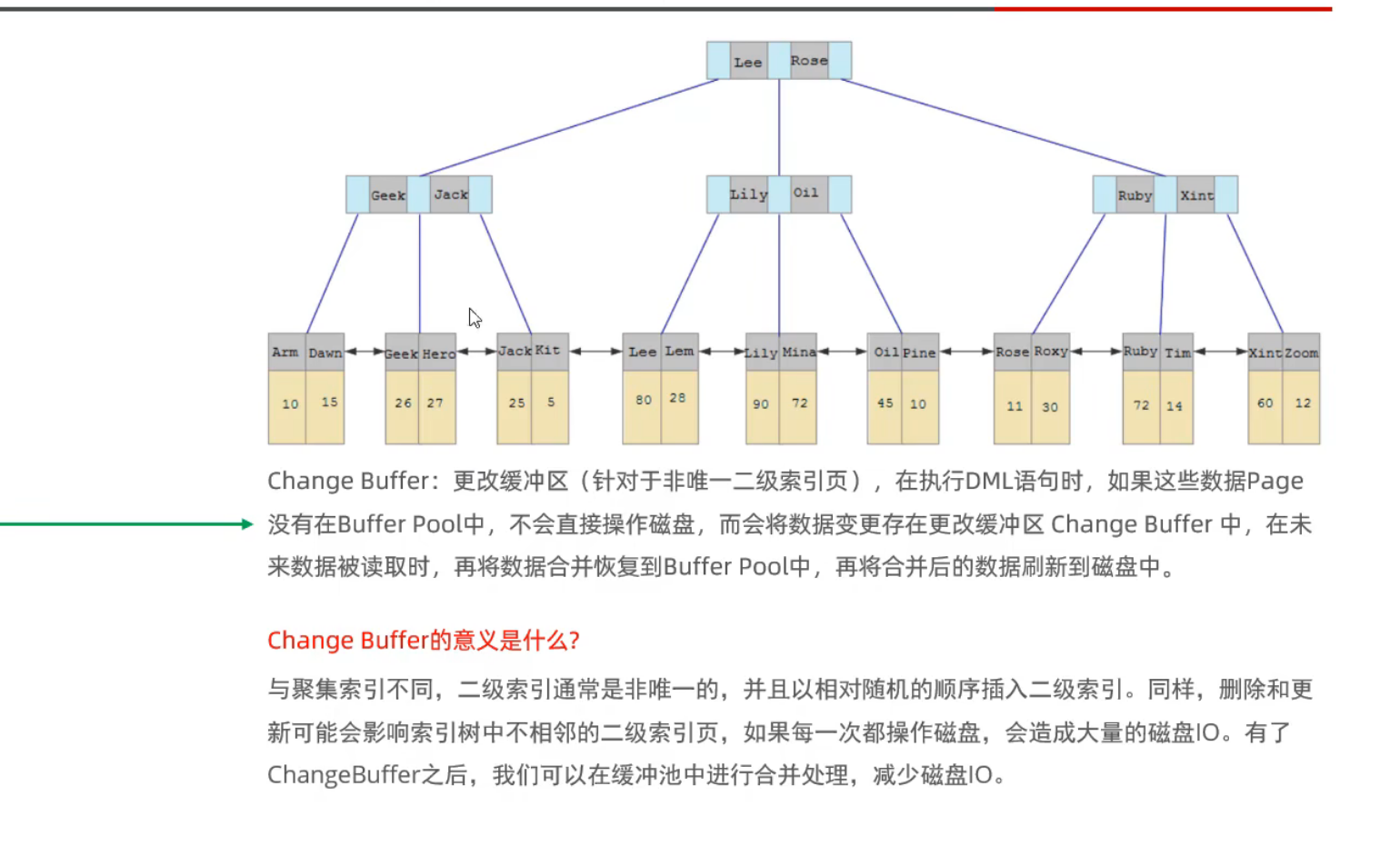
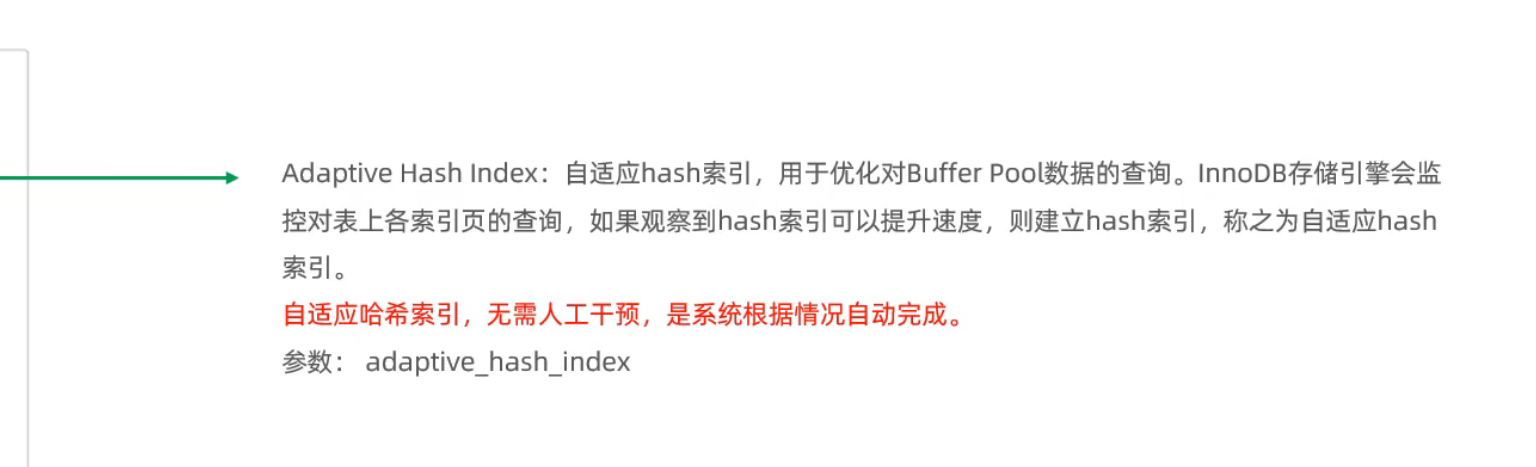
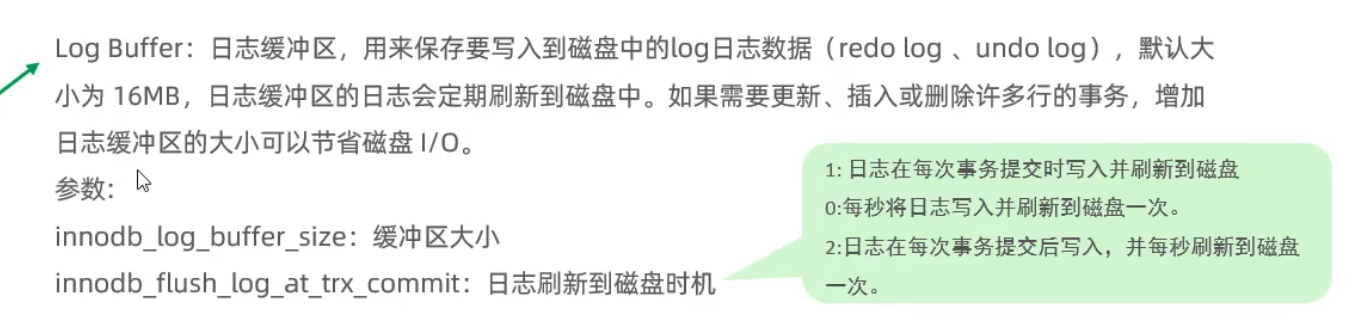
磁盘结构
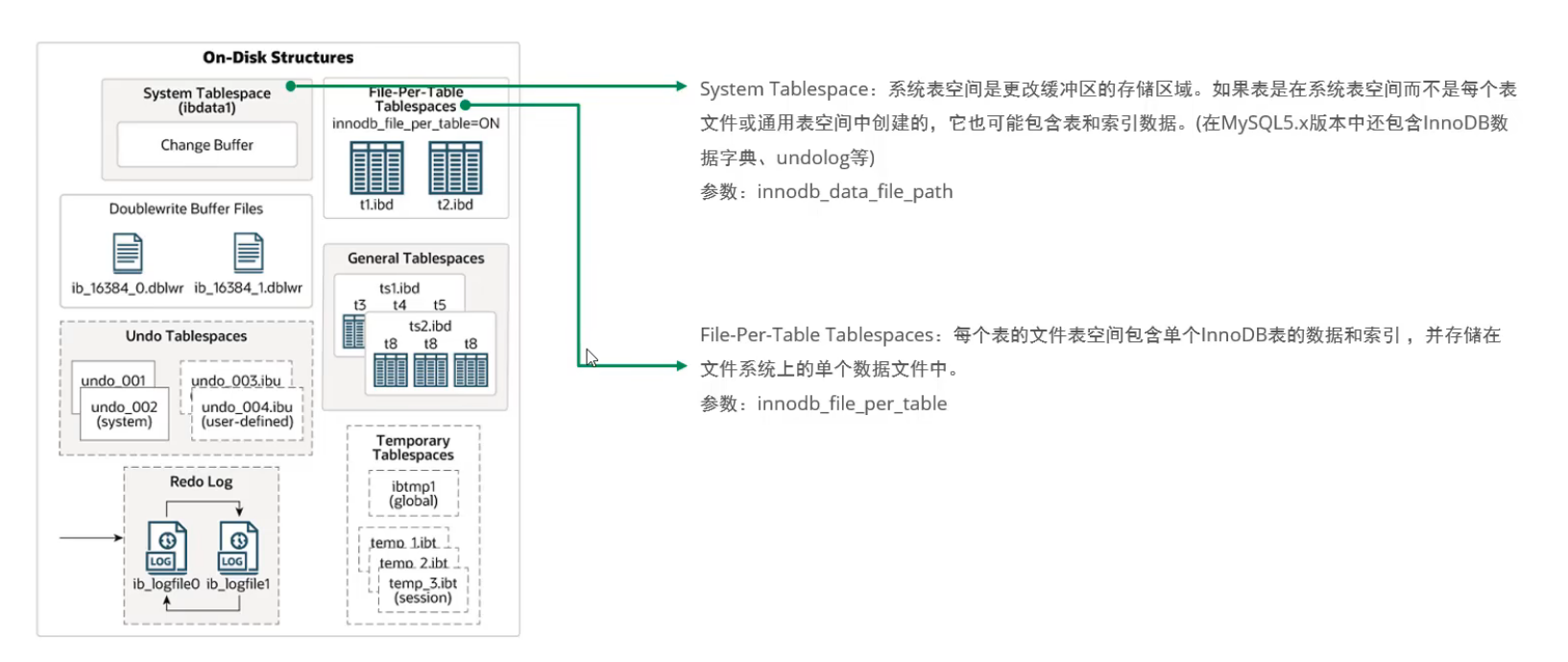
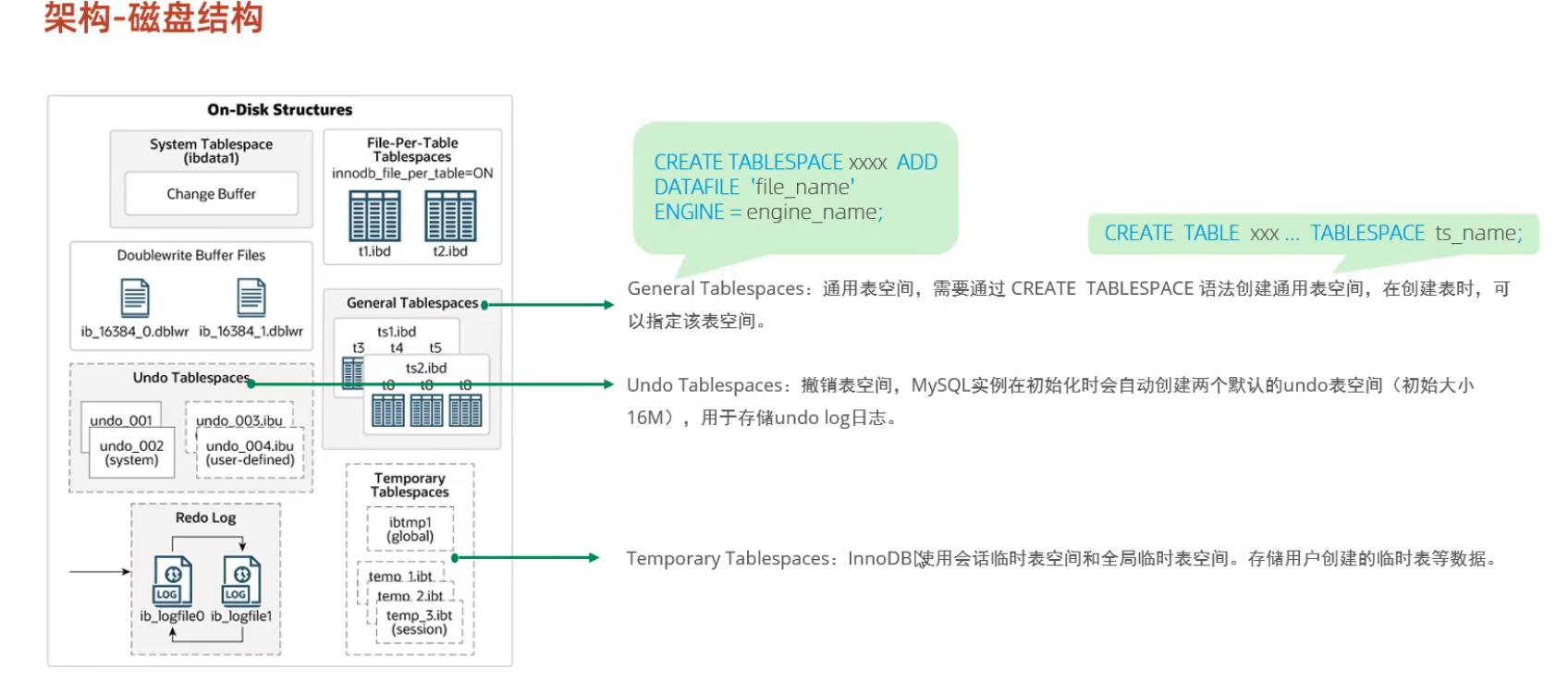
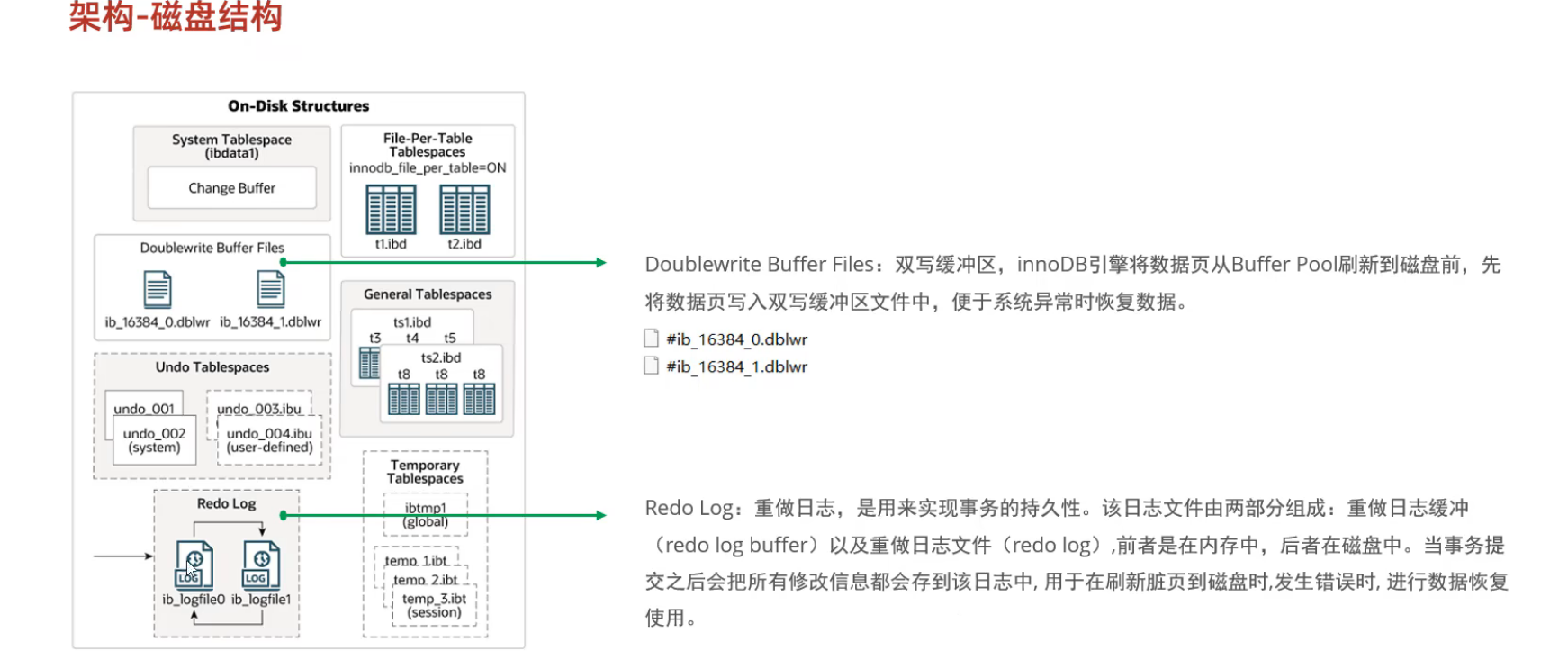
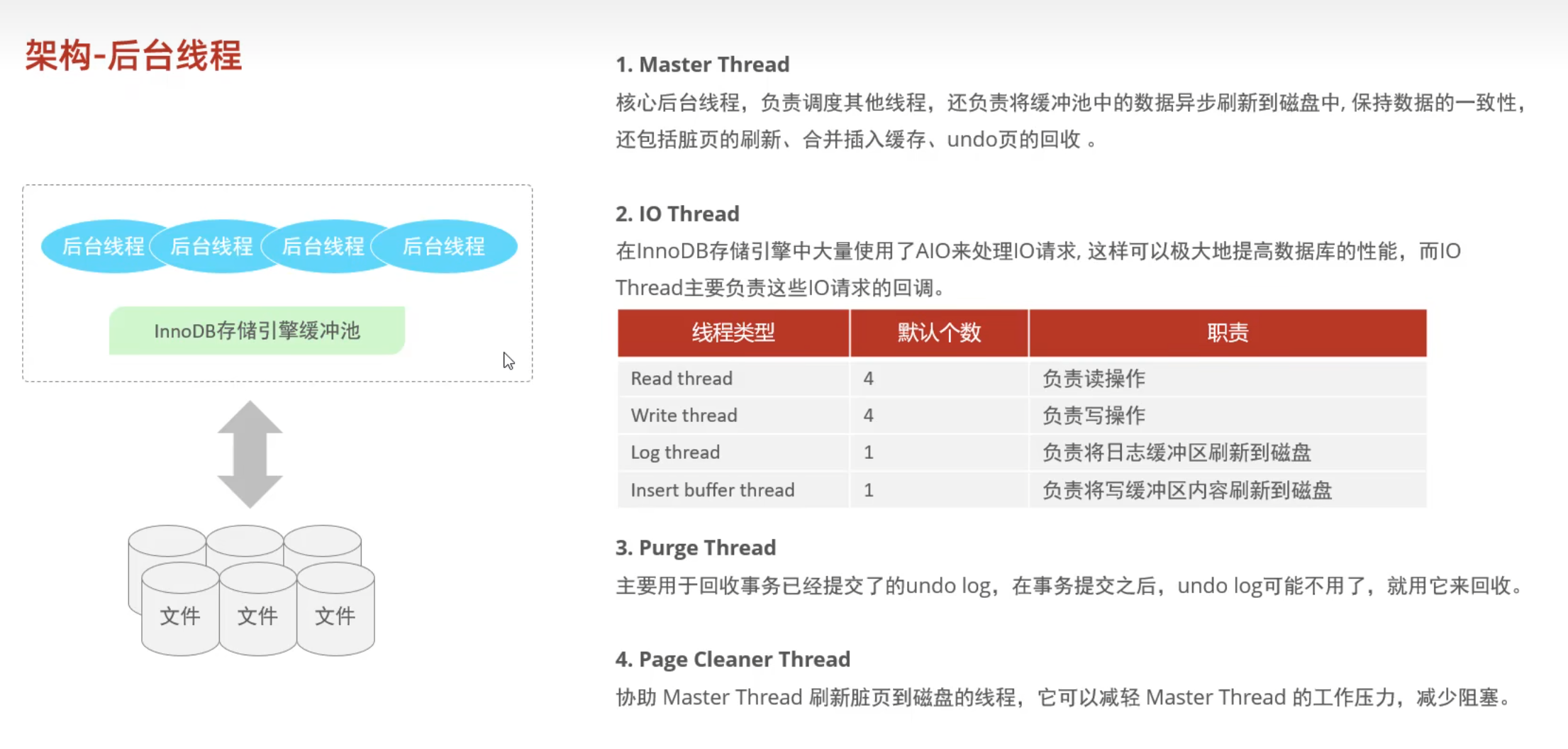
- 后台线程
- Master Thread
- IO Thread
- Purge Thread
- Page Cleaner Thread
事务原理
- ACID
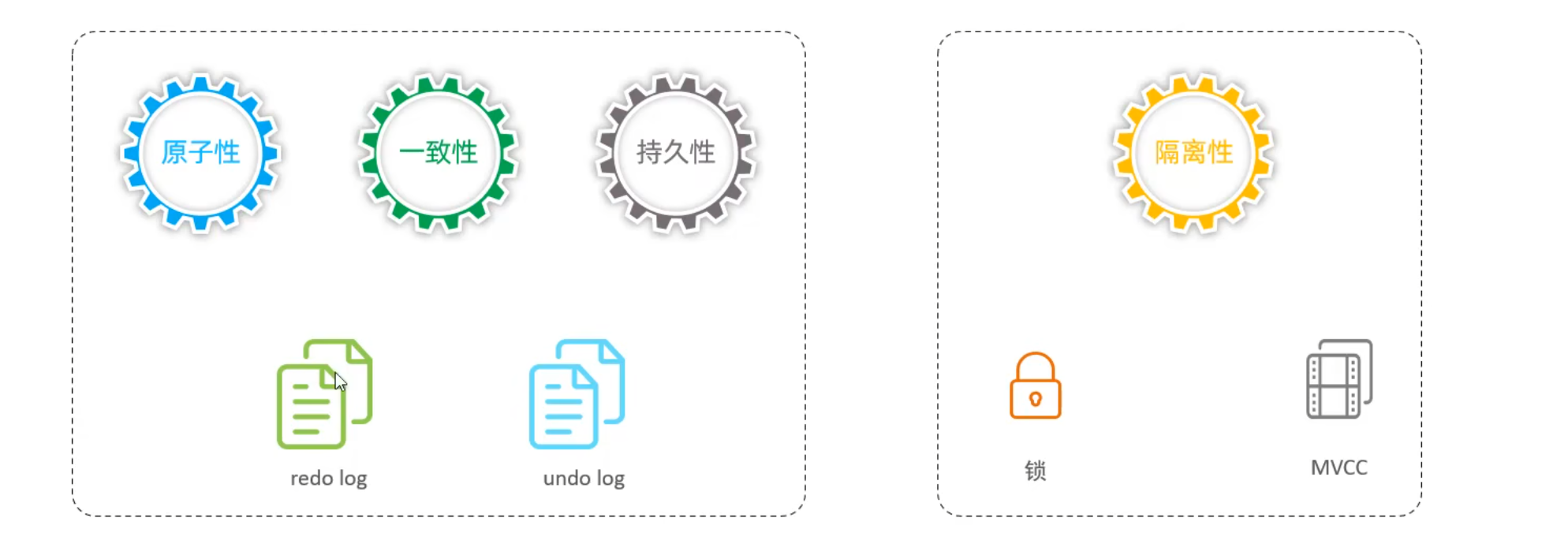
redo log 保证持久性
- redo log buffer
- redo log file
- WAL 操作先写日志后更改
- logfile1 和 lofile0 循环写
undo log 保证原子性
- undo log 主要记录 逻辑日志,记录的是反向操作
- undo log 销毁:
- undo log 采用段的方式进行管理和记录,放在回滚段中
MVCC (Mutil-Vesion Concurrency Control)
- 当前读: 读取的是最新记录,并且其他事务不能修改
- select … lock in share mode
- select … for update insert delete
- 快照读:
- 不加锁就是快照读,是非阻塞读
- Read Committed: 每次select都生成一个快照
- Repeatable Read: 开启事务后第一个select 语句才是快照读的地方
- Serializable:快照读退化为当前读
隐藏字段
- DB_TRX_ID: 最近修改事务ID
- DB_ROLL_PTR: 回滚指针
- DB_ROW_ID: 隐藏主键
undo log
ReadView
- m_ids
- min_trx_id
- max_trx_id
- creator_trx_id
